

지난 글에서는 노트북 한 대에서 GGUF 파일 하나를 돌리는 llama.cpp와 Ollama를 같은 자리마다 짝지어 보고, 엔진을 어디까지 직접 쥘 것인가로 둘을 갈랐다. 목표가 처리량이 아니라 「일단 내 기계에서 돈다」였기에 나올 수 있는 기준이다. 이번에는 요청 수십 개가 한꺼번에 들어오는 GPU 서버 쪽으로 자리를 옮겨, Hugging Face가 만든 서빙 엔진 TGI(Text Generation Inference)를 다룬다.
TGI는 HF Hub의 모델 이름 하나로 서버를 띄우고, 연속 배칭·FlashAttention·텐서 병렬을 기본으로 켠다. Hugging Face의 관리형 서비스인 Inference Endpoints가 오랫동안 이 엔진 위에서 돌았다. 먼저 알아 둘 것이 하나 있다. 지금 TGI 저장소의 README는 이 프로젝트가 유지보수 모드에 들어갔다고 밝히고 있다 — 앞으로는 작은 버그 수정과 문서 개선만 받고, 새로 시작하는 서빙은 vLLM이나 SGLang 같은 엔진을 권한다는 것이다. 그래서 이 글은 두 가지 독자를 겨냥한다. 이미 TGI를 운영하고 있어서 설정의 뜻을 알아야 하는 사람, 그리고 서빙 엔진이 안에서 무엇을 하는지를 한 엔진을 붙들고 이해하려는 사람이다. TGI의 인자 이름은 그 내부를 유난히 솔직하게 드러낸다.
라우터와 워커
런처·라우터·샤드
TGI 서버는 프로세스 셋으로 이뤄진다. 런처(text-generation-launcher)는 명령줄 인자를 받아 나머지 둘을 띄우고 지켜보는 관리자다. 라우터는 Rust로 쓰인 웹 서버로, HTTP 요청을 받고 입력을 토큰으로 바꿔 길이를 검사하고 결과를 SSE(Server-Sent Events)로 흘려 보낸다. 샤드는 파이썬으로 쓰인 모델 서버로, GPU 하나에 하나씩 떠서 실제 순전파를 한다. 라우터와 샤드는 유닉스 소켓 위의 gRPC로 이야기한다.
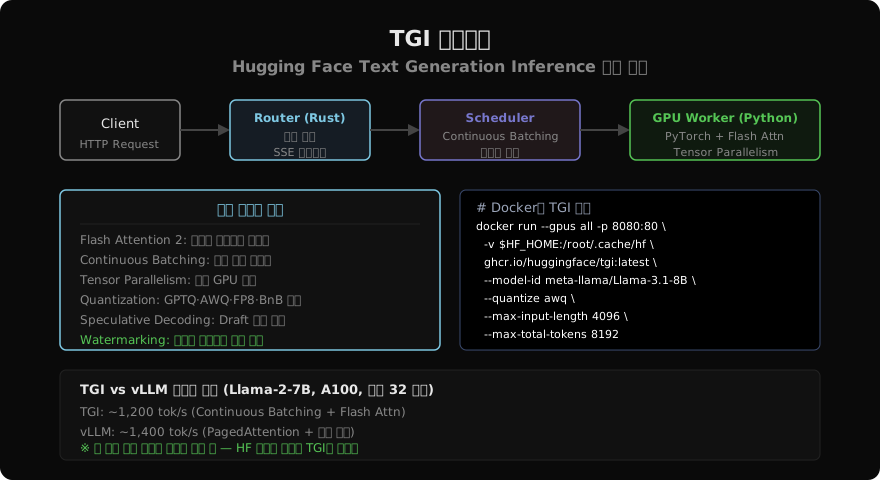
일을 이렇게 나눈 이유는 두 작업의 성격이 전혀 달라서다. 연결 수천 개를 붙잡고 토큰을 하나씩 흘려 보내는 일은 I/O가 대부분이라 비동기 Rust가 잘한다. 순전파는 GPU 커널을 부르는 일이라 PyTorch 생태계가 있는 파이썬이 편하다. 입력 검증도 라우터 쪽에서 한다. --validation-workers만큼의 토크나이저 작업자가 요청을 미리 토큰으로 바꿔 길이를 재므로, 너무 긴 요청은 GPU에 닿기 전에 거절된다.
docker run --gpus all --shm-size 1g \
  -e HF_TOKEN=$HF_TOKEN \
  -p 8080:80 \
  -v ~/.cache/huggingface:/data \
  ghcr.io/huggingface/text-generation-inference:latest \
  --model-id meta-llama/Llama-3.1-8B-Instruct \
  --max-input-tokens 4096 \
  --max-total-tokens 8192
반복 단위 스케줄링
배치를 짜는 스케줄러는 라우터 안에 있다. TGI는 연속 배칭을 쓴다. 요청 여러 개를 한 배치로 묶어 끝까지 함께 돌리는 대신, 토큰 하나를 만드는 순전파 한 번(반복 한 번)이 끝날 때마다 끝난 요청을 배치에서 빼고 기다리던 요청을 넣는다. 짧은 답을 받은 요청이 긴 답을 기다리느라 자리를 붙잡지 않으므로 GPU가 노는 시간이 준다. 원리 자체는 연속 배칭에서 다뤘다.
TGI에서 흥미로운 것은 새 요청을 끼워 넣는 비용을 인자로 드러낸다는 점이다. 새 요청은 프롬프트 전체를 한 번에 계산하는 프리필을 먼저 거쳐야 배치에 합류할 수 있고, 프리필을 하는 동안 이미 돌던 요청들은 토큰을 못 받고 멈춘다. --max-waiting-tokens(기본 20)는 돌던 배치가 토큰을 몇 개 만들 때마다 대기 요청을 끼워 넣을지를, --waiting-served-ratio(기본 0.3)는 대기 요청이 도는 요청 대비 얼마나 쌓였을 때 끼워 넣기를 고려할지를 정한다. 앞쪽을 작게 잡으면 새 요청의 첫 토큰이 빨라지는 대신 이미 답을 받던 사람의 토큰 사이 간격이 벌어진다.
프로세스 경계
라우터와 샤드가 따로 떠 있으므로 둘은 따로 실패한다. 라우터에는 --max-concurrent-requests(기본 128)라는 상한이 있어서, 이것을 넘는 요청은 기다리게 하지 않고 바로 거절한다. 문서의 설명대로 이것이 백프레셔다 — 끝없이 줄을 세워 모든 요청을 느리게 만드는 것보다, 넘치는 요청을 빨리 돌려보내 클라이언트가 다른 서버로 가게 하는 편이 낫다.
샤드 쪽 실패는 더 크다. 텐서 병렬로 모델을 넷에 나눠 담았다면 층마다 네 샤드가 모두 계산에 참여해야 하므로, 하나가 메모리 부족으로 죽으면 나머지 셋만으로는 순전파를 이어 갈 수 없다. 서버 전체를 다시 띄워야 하고, 그 사이 돌던 스트리밍 응답은 중간에 끊긴다. 그래서 TGI를 쿠버네티스에 올릴 때는 준비 상태 검사(/health)와 재시작 정책을 반드시 두고, 클라이언트는 스트림이 끊겼을 때 다시 요청하는 경로를 갖춰야 한다.
토큰 상한
요청 하나의 상한
TGI 설정에서 가장 자주 고치는 것이 토큰 상한 넷이다. 앞의 둘은 요청 하나를 제한한다. --max-input-tokens는 사용자가 보낼 수 있는 프롬프트 길이의 상한이고, --max-total-tokens는 프롬프트와 생성할 토큰을 합친 길이의 상한이다. 문서는 뒤쪽을 「가장 중요한 값」이라고 부른다. 1,512로 잡으면 프롬프트 1,000에 새 토큰 512를 요청할 수도, 프롬프트 1에 1,511을 요청할 수도 있다. 옛 이름 --max-input-length는 지금도 받지만 문서가 레거시로 표시한 이름이다.
두 값은 서버가 요청 하나에 최악으로 얼마의 메모리를 약속해야 하는지를 정한다. 값을 크게 잡을수록 긴 요청을 받을 수 있지만, 요청 하나가 차지할 수 있는 몫이 커져 한 배치에 함께 넣을 수 있는 요청 수가 준다.
프리필 상한
--max-batch-prefill-tokens는 한 번의 프리필에서 계산할 토큰 수의 상한이다. 프리필은 프롬프트 전체를 한꺼번에 처리하므로 순간 메모리를 가장 많이 쓰고 계산도 가장 무겁다. 새 요청 여러 개를 한 번에 끼워 넣을 때 이 값이 그 합을 막는다. 기본값은 max-input-tokens + 50이라, 가장 긴 요청 하나는 늘 한 번에 들어가게 되어 있다.
이 값을 너무 크게 잡으면 긴 프롬프트 여러 개가 한꺼번에 프리필되어 메모리가 튀고, 너무 작게 잡으면 새 요청들이 한 번에 조금씩만 합류해 대기열이 길어진다. 긴 문서를 요약하는 서비스처럼 프롬프트가 긴 부하에서 가장 먼저 손대는 값이다.
배치 전체 상한
--max-batch-total-tokens는 배치 안의 모든 요청이 쓰는 토큰의 합의 상한이고, 곧 KV 캐시의 크기다. KV 캐시는 이미 계산한 토큰의 키·값 벡터를 저장해 두는 메모리로, 다음 토큰을 만들 때 앞 토큰을 다시 계산하지 않게 해 준다. 토큰 하나가 캐시에서 차지하는 크기는 모델 구조로 계산된다.
Llama 3.1 8B는 층이 32개, KV 헤드가 8개, 헤드 차원이 128이다. 키와 값 둘을 bf16(2바이트)으로 저장하면 토큰 하나에 2 × 32 × 8 × 128 × 2 = 131,072바이트, 곧 128KB가 든다. A100 80GB에서 가중치 16GB와 작업 여유 몇 GB를 빼고 약 58GB가 남는다면 약 47만 토큰이 들어간다. --max-total-tokens가 8,192라면 최악의 요청 약 58개를 동시에 담을 수 있고, 실제 요청이 대부분 2,000토큰이라면 200개 넘게 담을 수 있다.
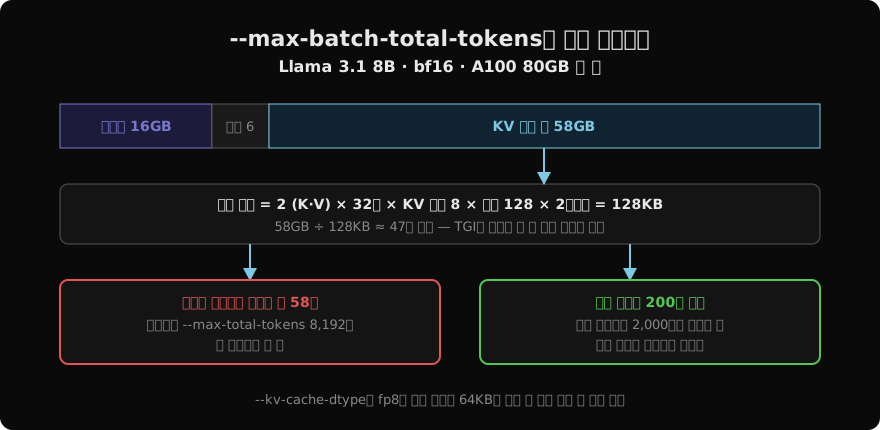
TGI는 이 값을 주지 않으면 모델을 올린 뒤 남은 메모리를 재서 스스로 정한다. 문서도 「남은 메모리에 들어가는 가장 큰 값」이어야 한다고 적고 있으므로, 대개는 비워 두는 것이 옳다. 직접 적는 것은 같은 GPU를 다른 프로세스와 나눠 쓸 때처럼 일부러 적게 잡아야 할 때다. 캐시가 처리량을 어떻게 정하는지는 다음 글에서 따로 파고든다.
설정 오류 증상
넷이 어긋나면 증상이 셋으로 나온다. 첫째는 요청 거절이다. 프롬프트가 --max-input-tokens를 넘거나, 프롬프트에 max_new_tokens를 더한 값이 --max-total-tokens를 넘으면 라우터가 422 오류로 돌려보낸다. 사용자가 「긴 문서만 넣으면 실패한다」고 한다면 이것이다.
둘째는 프리필 OOM이다. --max-batch-prefill-tokens를 크게 잡아 두고 긴 요청이 몰리면 기동 때는 멀쩡하다가 부하가 걸린 순간 샤드가 메모리 부족으로 죽는다. 셋째는 처리량 정체다. --max-total-tokens를 모델의 최대 문맥 길이인 128K로 잡아 두면 요청마다 약속하는 몫이 너무 커서, 캐시에 여유가 있어도 동시에 몇 개밖에 못 돌린다. GPU 사용률은 낮은데 대기열이 길다면 이 값을 실제 트래픽의 길이 분포에 맞춰 내린다.
양자화 옵션
사전 양자화 가중치
--quantize는 가중치를 줄여 올리는 방법을 고르는 인자다. 값은 크게 두 무리로 갈린다. 첫째 무리는 미리 양자화해 둔 가중치를 받는 방식이다. awq·gptq·marlin·exl2가 여기 들고, 저마다 그 형식으로 변환해 올린 모델 저장소가 따로 있어야 한다. 이 경우에는 모델 설정에 양자화 방식이 적혀 있어서 --quantize를 주지 않아도 TGI가 알아서 읽는다. 문서는 GPTQ·AWQ 모델에 Marlin 커널을 자동으로 쓰며, AWQ가 지연이 더 낮아 가능하면 GPTQ를 대신하라고 권한다.
두 방식의 차이와 변환 절차는 AWQ와 GPTQ에서 다룬다. 여기서 기억할 제약은 하나다. exl2는 텐서 병렬을 지원하지 않아 --num-shard를 2 이상으로 줄 수 없다.
로드 시점 양자화
둘째 무리는 원본 가중치를 올리면서 누르는 방식이다. eetq는 8비트, bitsandbytes는 8비트, bitsandbytes-nf4와 bitsandbytes-fp4는 4비트이고, 따로 변환한 저장소 없이 어떤 모델에든 걸 수 있다. 대신 문서가 직접 경고하듯 bitsandbytes 계열은 16비트 원본보다 확연히 느리다. 메모리를 절반이나 4분의 1로 줄여 주지만, 속도를 대가로 치른다. eetq는 bitsandbytes 8비트를 대신할 더 빠른 선택지로 소개돼 있다. fp8은 H100 이상에서 쓰는 8비트 부동소수점이다.
두 무리는 기동 시간에서도 갈린다. 사전 양자화 가중치는 이미 작아서 내려받기와 적재가 빠르다. 로드 시점 양자화는 원본 16비트 가중치를 통째로 받아 GPU에 올리면서 눌러야 하므로, 70B급이면 내려받는 양만 140GB다. 자동 확장으로 새 인스턴스를 자주 띄우는 환경이라면 이 차이가 곧 부하가 몰렸을 때 새 서버가 준비되는 시간이다.
샤딩과의 조합
--quantize와 --num-shard를 함께 주면 가중치는 각 샤드가 자기 몫을 받아 올리는 과정에서 양자화된다. 70B를 AWQ 4비트로 네 장에 나누면 샤드 하나가 약 9~10GB의 가중치를 들고, 나머지 메모리는 KV 캐시로 간다. 양자화의 효과가 여기서 두 겹으로 나타난다. 가중치가 작아진 만큼 같은 카드 수로 더 큰 모델을 올릴 수 있고, 같은 모델이라면 캐시에 쓸 메모리가 늘어 동시 요청이 는다.
KV 캐시 자체를 누르는 것은 다른 인자다. --kv-cache-dtype에 fp8_e4m3fn이나 fp8_e5m2를 주면 캐시를 8비트로 저장해, 앞 절의 토큰당 128KB가 64KB로 준다.
docker run --gpus all --shm-size 1g -p 8080:80 \
  -v $HF_HOME:/data \
  ghcr.io/huggingface/text-generation-inference:latest \
  --model-id hugging-quants/Meta-Llama-3.1-70B-Instruct-AWQ-INT4 \
  --num-shard 4 \
  --max-input-tokens 8192 \
  --max-total-tokens 16384 \
  --kv-cache-dtype fp8_e4m3fn \
  --speculate 3
마지막 줄의 --speculate는 한 번에 토큰 몇 개를 미리 추측할지 정한다. 모델에 Medusa 헤드가 있으면 그것을 쓰고, 없으면 프롬프트에 이미 나온 n-gram을 되풀이할 것이라 추측하는 방식을 쓴다. 뒤쪽은 계산이 거의 들지 않지만 이득이 과제에 크게 달려 있어서, 코드 수정처럼 입력을 되풀이하는 과제에서 잘 듣고 자유로운 글쓰기에서는 거의 효과가 없다. 원리는 투기적 디코딩에서 다룬다.
문법 제약 출력
문법 제약 원리
TGI는 요청에 문법을 실어 보내면 출력이 그 문법을 벗어나지 못하게 한다. 원리는 디코딩 단계에서 토큰을 거르는 것이다. JSON 스키마나 정규식을 유한 상태 기계로 바꿔 두고, 토큰을 하나 고를 때마다 지금 상태에서 문법상 올 수 없는 토큰의 확률을 0으로 만든 뒤 남은 것 가운데서 고른다. 모델이 따르지 않을 수 없으므로 「JSON으로만 답해 줘」라는 프롬프트와 달리 형식이 깨질 일이 없다. TGI는 이 부분에 Outlines 라이브러리를 쓴다.
from huggingface_hub import InferenceClient

client = InferenceClient("http://localhost:8080")

schema = {
    "type": "object",
    "properties": {
        "name": {"type": "string"},
        "age": {"type": "integer"},
        "city": {"type": "string"},
    },
    "required": ["name", "age", "city"],
}

result = client.text_generation(
    "다음 텍스트에서 정보를 추출: 김민수(32세)는 부산에 삽니다.",
    grammar={"type": "json", "value": schema},
    max_new_tokens=100,
)
# {"name": "김민수", "age": 32, "city": "부산"}
형식이 보장된다고 내용이 보장되는 것은 아니다. 스키마는 age가 정수라는 것만 강제하지 32가 맞는 값인지는 모른다. 제약 디코딩이 형식을 어떻게 강제하는지는 제약 디코딩에서 더 자세히 다룬다.
정규식 제약
{"type": "regex", "value": ...}로 정규식을 걸 수도 있다. JSON 스키마보다 작은 자리에서 값을 한다. 분류 라벨을 긍정|부정|중립 셋 중 하나로 묶거나, 날짜를 \d{4}-\d{2}-\d{2} 꼴로만 내게 하는 식이다. 라벨 분류에 쓰면 모델이 「이 리뷰는 긍정적인 편이라고 볼 수 있습니다」처럼 길게 답해서 뒤에서 파싱하느라 애쓸 일이 없어지고, 생성 토큰이 한두 개로 줄어 비용도 준다.
첫 토큰 지연
제약에는 대가가 있다. 문법을 상태 기계로 바꾸는 컴파일이 요청 앞에 붙고, 스키마가 복잡할수록 — 중첩이 깊고 선택지가 많을수록 — 오래 걸린다. 같은 스키마로 다시 오면 캐시된 것을 쓰므로 비용은 대개 새 스키마의 첫 요청에 몰린다. 그래서 잴 때는 스키마마다 첫 요청과 두 번째 요청의 첫 토큰 지연을 따로 기록한다. 둘의 차이가 컴파일 비용이다.
요청마다 스키마가 달라지는 서비스라면 이 비용이 매번 붙는다. 스키마를 몇 가지로 고정해 재사용하게 설계하는 것이 가장 확실한 대책이다. 이 기능을 아예 끄는 --disable-grammar-support 인자도 있다.
텐서 병렬
층 안의 분할
--num-shard는 모델을 GPU 몇 장에 나눌지 정한다. 여기서 나누는 방식이 텐서 병렬이다. 층을 앞뒤로 잘라 카드마다 몇 층씩 맡기는 것(파이프라인 병렬)이 아니라, 층 하나 안의 행렬을 쪼개 모든 카드가 모든 층의 일부를 맡는다. 어텐션이라면 헤드를 카드별로 나누고, FFN이라면 행렬의 열과 행을 나눈다. 인자를 주지 않으면 TGI는 보이는 GPU를 전부 쓴다.
텐서 병렬의 장점은 모든 카드가 매 순간 함께 일한다는 것이다. 파이프라인 병렬은 앞 카드가 계산하는 동안 뒤 카드가 기다리지만, 텐서 병렬은 그런 빈 시간이 없어 요청 하나의 지연을 줄인다. 대가는 통신이다. 층마다 카드들이 부분 결과를 모아 합치는 all-reduce를 해야 한다. 원리는 텐서 병렬에서 다뤘다.
헤드 수 제약
헤드를 카드별로 나누므로 헤드 수가 샤드 수로 나눠떨어져야 한다. Llama 3.1 70B는 쿼리 헤드 64개, KV 헤드 8개라 2·4·8장으로는 나눌 수 있지만 3장이나 6장으로는 안 된다. KV 헤드가 8개뿐이라 8장을 넘기면 카드마다 KV 헤드를 하나보다 적게 가질 수 없어 복제가 생긴다. 카드 장수는 모델 크기만 보고 정하지 말고 헤드 수를 먼저 확인한다.
한 기계에 GPU 넷이 있는데 2장짜리 모델 둘을 띄우고 싶다면, 문서의 예처럼 CUDA_VISIBLE_DEVICES=0,1과 CUDA_VISIBLE_DEVICES=2,3으로 보이는 카드를 나누고 각각 --num-shard 2로 띄운다. 처리량이 목표라면 이렇게 작은 복제본 여럿을 두는 편이 큰 샤드 하나보다 나을 때가 많다. 통신이 적고, 한 복제본이 죽어도 다른 쪽이 받는다.
카드 간 연결
all-reduce가 층마다 일어나므로 카드 사이 연결의 대역폭이 곧 속도다. A100의 NVLink는 카드당 600GB/s인데, PCIe 4.0 x16은 한 방향 약 32GB/s다. 스무 배 가까운 차이다. NVLink로 묶인 서버에서는 4장 샤딩이 지연을 거의 선형으로 줄이지만, PCIe로만 연결된 소비자용 카드 여러 장에서는 통신이 계산을 잡아먹어 두 장이 한 장보다 별로 빠르지 않을 수 있다.
그래서 샤드 수를 정하기 전에 nvidia-smi topo -m으로 카드 사이 연결을 먼저 본다. 표에 NV로 시작하는 칸이 NVLink이고, PHB·SYS처럼 적힌 칸은 PCIe나 CPU를 거친다. 후자라면 텐서 병렬보다 모델을 양자화해 한 장에 올리는 편이 나을 수 있다.
클라이언트와 API
Python 클라이언트
TGI 전용 API는 /generate와 스트리밍용 /generate_stream이다. huggingface_hub의 InferenceClient가 이것을 감싼다.
from huggingface_hub import InferenceClient

client = InferenceClient("http://localhost:8080")

text = client.text_generation(
    "Python의 asyncio 이벤트 루프를 설명해줘",
    max_new_tokens=300,
    temperature=0.7,
    top_p=0.9,
    repetition_penalty=1.05,
)

for token in client.text_generation(
    "한국 경제의 특징을 설명해줘", max_new_tokens=400, stream=True
):
    print(token, end="", flush=True)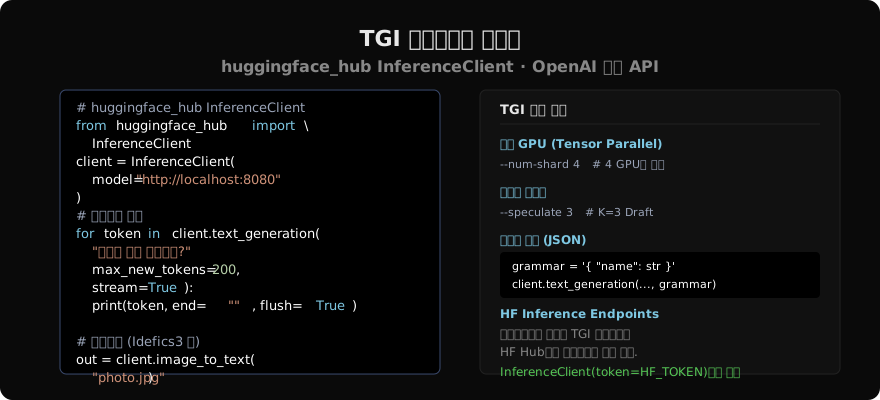
처리량을 잴 때 이 클라이언트로 요청을 하나씩 순서대로 보내면 연속 배칭이 일할 기회가 없어 서버의 실력보다 훨씬 낮은 수가 나온다. 동시 요청 수를 바꿔 가며 보내야 하고, 저장소에 들어 있는 text-generation-benchmark 도구가 배치 크기별 프리필·디코드 지연을 따로 재 준다.
OpenAI 호환 API
TGI에는 OpenAI Chat Completions와 호환되는 Messages API(/v1/chat/completions)도 있다. 서버가 모델의 채팅 템플릿으로 메시지를 프롬프트로 바꿔 주므로, OpenAI SDK로 짠 코드를 주소만 바꿔 붙일 수 있다.
from openai import OpenAI

client = OpenAI(base_url="http://localhost:8080/v1", api_key="-")

response = client.chat.completions.create(
    model="tgi",
    messages=[
        {"role": "system", "content": "You are a helpful assistant."},
        {"role": "user", "content": "머신러닝과 딥러닝의 차이는?"},
    ],
    max_tokens=300,
)
print(response.choices[0].message.content)
같은 API로 비전 언어 모델에 이미지를 넣을 수도 있다. content를 목록으로 두고 image_url 항목과 text 항목을 함께 담으면 된다. 채팅 템플릿이 모델 저장소에 없거나 틀려 있으면 이 API가 엉뚱한 프롬프트를 만드는데, --tokenizer-config-path로 템플릿이 든 설정 파일을 따로 줄 수 있다.
Inference Endpoints
직접 서버를 관리하기 싫다면 Hugging Face의 Inference Endpoints가 있다. Hub의 모델을 골라 클라우드와 GPU를 정하면 관리형 인스턴스가 뜨고, 주소 하나를 받는다. 클라이언트 코드는 로컬 서버와 같고 주소와 토큰만 다르다.
client = InferenceClient(
    "https://xxx.us-east-1.aws.endpoints.huggingface.cloud",
    token="hf_...",
)
Endpoints는 TGI 말고도 여러 엔진을 고를 수 있게 넓어져 왔다. 어느 엔진을 쓸 수 있는지, 로컬에서 쓰던 인자를 그대로 옮길 수 있는지는 배포 화면의 엔진 선택지에서 확인한다.
vLLM과 갈리는 자리
유지보수 모드
두 엔진을 고르는 기준은 한동안 기능 목록이었다. TGI는 HF Hub와 게이트 모델의 토큰 처리가 붙어 있고 문법 제약 출력이 일찍 들어왔으며, vLLM은 PagedAttention으로 처리량이 높고 OpenAI 호환 서버가 기본이었다. 그 차이는 대부분 좁혀졌다. TGI도 Messages API를 갖췄고, vLLM도 Hub 모델 이름을 그대로 받고 구조화 출력을 지원한다.
지금 가장 큰 기준은 기능이 아니라 앞날이다. TGI가 유지보수 모드에 들어갔으므로 새 모델 구조나 새 GPU 세대를 지원하는 속도는 앞으로 적극적으로 개발되는 엔진을 따라가기 어렵다. 새로 서빙을 시작한다면 vLLM이나 SGLang을 먼저 보는 것이 합리적이고, TGI의 README도 그렇게 권한다.
이전 범위
그렇다고 돌고 있는 TGI를 당장 옮겨야 하는 것은 아니다. 작은 수정은 계속 받으므로 지금 쓰는 모델이 잘 돌고 있다면 급할 것이 없다. 옮길 때 무엇이 따라가고 무엇이 남는지를 먼저 적어 두면 된다.
OpenAI 호환 API로 호출하고 있다면 클라이언트 쪽은 주소만 바꾸면 된다. TGI 전용 /generate와 그 응답 형식에 기대고 있다면 그 부분은 다시 짜야 한다. 서버 쪽 인자는 이름이 다르다. 토큰 상한과 샤드 수, 양자화 방식은 vLLM에도 대응하는 인자가 있지만 기본값과 자동 설정 방식이 달라서, 이 글에서 계산한 KV 캐시 예산을 새 엔진에서 다시 확인해야 한다.
선택 기준
정리하면 기준은 셋이다. 새로 시작하는가, 이미 운영 중인가가 첫째이고, 새로 시작한다면 TGI를 고를 이유가 크지 않다. 둘째는 호출 방식이다. OpenAI 호환 API를 쓰고 있다면 엔진은 언제든 갈아 끼울 수 있는 부품이 되므로, 지금 TGI를 쓰고 있더라도 클라이언트를 그 API로 옮겨 두는 것이 가장 싼 보험이다. 셋째는 부하의 모양이다. 어느 엔진이든 이 글의 토큰 상한 넷과 캐시 계산은 그대로 쓰이므로, 엔진을 바꾸기 전에 지금 트래픽의 프롬프트 길이 분포와 동시 요청 수를 먼저 재 둔다.
이 글 곳곳에서 토큰 상한과 배치 크기, 양자화가 결국 KV 캐시에 몇 토큰을 담느냐로 돌아왔다. 다음 글은 그 캐시 하나를 붙들고, 추론 메모리가 어떻게 처리량을 정하는지를 본다.
읽어주셔서 감사합니다. 😊