

지난 글에서 추론 엔진 넷을 나란히 놓고 비교했다. 그중 둘, llama.cpp와 Ollama는 나머지 둘과 성격이 다르다. vLLM과 TGI가 GPU 서버 한 대에 요청 수십 개를 밀어 넣는 도구라면, 이 둘은 노트북 한 대에서 나 혼자 쓰는 모델을 돌린다. 목표가 처리량이 아니라 「일단 여기서 돈다」는 것이다.
그리고 이 둘은 서로 경쟁하는 관계가 아니라 뿌리가 같다. Ollama는 llama.cpp를 감싸는 도구로 출발했고, 지금도 같은 GGUF 파일을 같은 GGML 텐서 라이브러리 위에서 돌린다. 다만 2025년 5월부터는 멀티모달 모델을 제대로 담으려고 GGML을 직접 부르는 자체 엔진을 따로 세웠고, llama.cpp는 그 옆의 백엔드 하나가 되었다. 그래서 둘을 나란히 놓고 속도를 재는 일은 생각만큼 깔끔하지 않다 — 같은 파일이라도 모델에 따라 아래에서 도는 코드가 다를 수 있다. 정작 갈리는 것은 속도가 아니라 엔진을 어디까지 직접 쥘 것인가다. 빌드부터 손에 넣고 플래그를 하나씩 맞출 것인가, 아니면 그 전부를 감싼 도구에 맡기고 모델 이름만 부를 것인가. 이 글은 그 결정을 위해 두 도구를 같은 자리마다 짝지어 본다.
공통 뿌리와 차이
로컬 추론의 조건
로컬 추론이 성립하려면 조건이 하나다. 모델이 그 기계의 메모리에 들어가야 한다. 8B 모델을 FP16으로 그대로 두면 파라미터 하나에 2바이트씩 16GB인데, 4비트로 줄이면 5GB 아래로 내려온다. 개인 기계에서 LLM을 돌린다는 이야기가 성립한 것은 이 축소가 먼저 있었기 때문이다. 양자화 자체는 양자화 완전 정복에서 따로 다뤘다.
줄인 모델을 담는 그릇이 GGUF다. GGUF는 llama.cpp가 쓰는 단일 파일 모델 포맷으로, 가중치와 토크나이저와 메타데이터를 한 파일에 몰아 담는다. 파일 하나만 있으면 되므로 설정 파일이나 토크나이저를 따로 챙길 일이 없고, 무엇보다 mmap으로 파일을 그대로 주소 공간에 걸어 놓을 수 있어 로딩이 「읽어 복사하기」가 아니라 「걸어 두기」가 된다. 레벨 표기를 읽는 법과 파일 내부 구조는 GGUF 완전 정복에 있다.
계산은 GGML이라는 C 텐서 라이브러리가 맡는다. Georgi Gerganov가 만든 것으로, 그가 2023년 초에 공개한 llama.cpp가 이 라이브러리 위에 올라앉은 구조다. CPU에서는 AVX2·AVX-512 같은 SIMD 명령을 써서 커널을 돌리고, Apple Silicon에서는 Metal, NVIDIA에서는 CUDA, AMD에서는 ROCm, 그 밖에는 Vulkan 백엔드로 갈린다. 하나의 GGUF 파일이 이 백엔드 전부에서 똑같이 읽힌다는 점이 이 생태계의 힘이다.
여기서 미리 알아 둘 것이 하나 있다. CPU 추론의 천장은 계산량이 아니라 메모리 대역폭이 정한다. 토큰 하나를 만들 때마다 모델 가중치를 처음부터 끝까지 한 번 읽어야 하기 때문이다. 4.6GB짜리 모델이라면 토큰 하나에 4.6GB를 읽는 셈이고, 메모리 대역폭을 넉넉히 50GB/s로 잡아도 초당 열 번 남짓이 한계다. 코어를 더 꽂아도 이 벽은 안 움직인다. 이 사정은 CPU만으로 LLM을 돌린다는 것에서 더 파고들었다.
Ollama의 추가 층
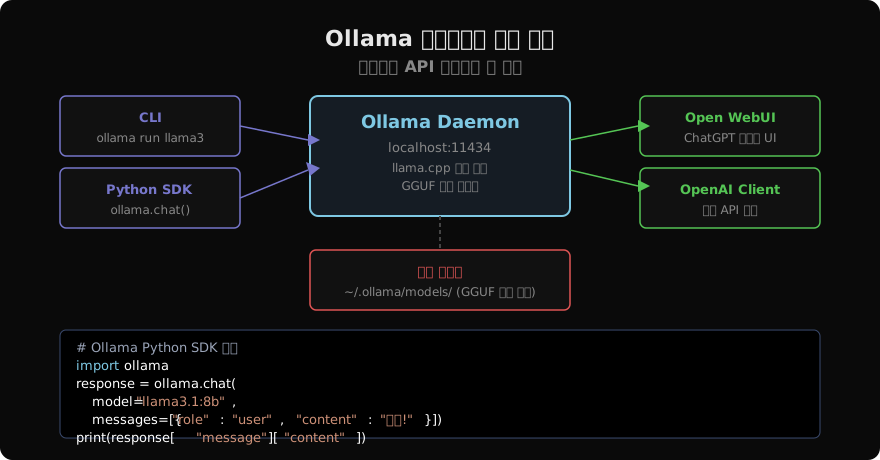
Ollama는 llama.cpp와 GGML을 안에 넣고 그 위에 세 가지를 얹은 도구다. 첫째는 모델 저장소다. 파일 경로 대신 llama3.1:8b 같은 이름과 태그로 모델을 부르고, 내려받기와 캐싱과 중복 제거를 도구가 알아서 한다. 둘째는 상주 데몬이다. 설치하면 백그라운드에서 서버가 하나 떠 있고 요청이 오면 그때 모델을 메모리에 올린다. 셋째는 Modelfile이다. 시스템 프롬프트와 샘플링 파라미터를 모델에 박아 새 이름으로 굳힌다.
이 셋의 공통점은 전부 모델 파일과 프로세스를 관리하는 일이라는 것이다. 토큰을 실제로 만들어 내는 계산은 그 아래 GGML 커널이 하고, 이 세 층은 거기에 손대지 않는다. 그래서 같은 GGUF를 같은 기계에서 돌렸는데 속도가 눈에 띄게 갈렸다면 이 층이 아니라 다른 데를 봐야 한다 — 양자화 레벨이 다르거나, 오프로드 설정이 다르거나, 그 모델이 서로 다른 엔진에 실린 것이다.
모델을 이름으로 부르는 편의가 성능을 얹어 주지는 않는다는 이 사실이 선택의 기준을 옮겨 놓는다. 고를 거리는 「무엇이 빠른가」가 아니라 「무엇을 내가 정하고 무엇을 도구에 맡길 것인가」다.
차이점
둘이 실제로 갈리는 자리는 다섯이다.
| 갈리는 것 | llama.cpp | Ollama |
|---|---|---|
| 모델 파일 | 내가 경로를 지정한다 | 이름·태그로 부르고 도구가 관리한다 |
| 옵션 | 엔진의 플래그가 전부 열려 있다 | PARAMETER로 추린 것만 |
| 프로세스 | 내가 띄우고 내린다 | 데몬이 로드·언로드를 정한다 |
| 버전 고정 | 소스 커밋 단위로 고정된다 | 도구 릴리스에 묶인 엔진 |
| 설정의 자리 | 실행할 때 주는 플래그 | 모델 안에 박힌 Modelfile |
앞의 셋은 편의와 통제를 맞바꾼 결과이고 방향이 뻔하다. 편하게 쓰면 손잡이가 줄고, 손잡이를 다 쥐면 손이 많이 간다. 정작 사람을 갈라놓는 것은 뒤의 둘이다. 엔진 버전을 커밋 단위로 못 박아야 하는 자리가 있고 — 양자화 커널이 바뀌면 같은 파일에서 다른 숫자가 나온다 — 반대로 설정을 모델 안에 박아 통째로 나눠 주고 싶은 자리가 있다. 이 둘은 편의의 문제가 아니라 요구사항의 문제라서, 여기에 걸리면 선택이 그 자리에서 끝난다.
llama.cpp 빌드와 실행
백엔드와 빌드
llama.cpp는 배포판을 받아 쓰는 것보다 직접 빌드하는 쪽이 기본이다. 소스를 받아 CMake로 세우면 되고, 여기서 정해야 하는 것은 하나뿐이다 — 어느 백엔드로 컴파일할 것인가.
git clone https://github.com/ggml-org/llama.cpp
cd llama.cpp

cmake -B build                       # CPU 전용
cmake -B build -DGGML_CUDA=ON        # NVIDIA CUDA
cmake -B build -DGGML_METAL=ON       # Apple Metal

cmake --build build -j$(nproc)
백엔드는 실행할 때 고르는 값이 아니라 컴파일할 때 굳는 값이다. 이것이 첫 함정이다. CPU 전용으로 빌드해 놓고 나중에 GPU 오프로드 플래그를 아무리 줘도 그 플래그가 할 일이 없다. 「GPU가 안 잡힌다」며 옵션을 이리저리 바꿔 보다가 결국 빌드부터 다시 하게 되는 일이 흔하다. GPU를 쓸 생각이 조금이라도 있으면 처음부터 그 옵션을 켜고 빌드한다 — 켜 두어도 오프로드 레이어를 0으로 주면 CPU로만 돈다.
빌드가 끝나면 build/bin/ 아래에 실행 파일 여러 개가 생긴다. 하나짜리 바이너리가 아니라 도구 모음이라는 점이 이 프로젝트의 성격을 그대로 보여 준다.
GGUF 파일
모델은 Hugging Face에서 바로 받는다. GGUF 변환본을 올려 주는 계정이 몇 있고, 파일 이름에 양자화 레벨이 그대로 적혀 있다. 내려받는 명령은 hf다 — 예전 huggingface-cli가 이 이름으로 바뀌었으니 옛 글의 명령이 안 먹으면 그 자리를 본다.
pip install huggingface-hub

hf download \
  bartowski/Meta-Llama-3.1-8B-Instruct-GGUF \
  Meta-Llama-3.1-8B-Instruct-Q4_K_M.gguf \
  --local-dir ./models

hf download \
  bartowski/Phi-3.5-mini-instruct-GGUF \
  Phi-3.5-mini-instruct-Q4_K_M.gguf \
  --local-dir ./models
두 모델을 함께 적은 데는 이유가 있다. 위쪽이 4.6GB, 아래쪽이 2.2GB다. 16GB RAM 노트북에서 8B Q4_K_M을 올리면 모델이 4.6GB, 컨텍스트를 8192로 잡은 KV 캐시가 1GB 남짓, 거기에 운영체제와 브라우저가 이미 쓰고 있는 몫이 붙는다. 돌긴 돌지만 여유가 없어 스왑이 시작되면 속도가 절벽처럼 떨어진다. 처음 시험할 때는 작은 모델로 파이프라인이 도는지부터 확인하고, 품질이 모자랄 때 큰 쪽으로 옮기는 순서가 안전하다.
양자화 레벨은 Q4_K_M이 크기와 품질의 균형점으로 굳어져 있다. Q8_0은 품질이 거의 원본이지만 파일이 두 배고, Q3 이하는 파일은 작아지되 답이 눈에 띄게 흐트러진다. 어느 레벨이 무엇을 어떻게 줄이는지는 GGUF 글에 표로 있다.
실행 파일 모음
build/bin/에 생기는 실행 파일 중 이 글에서 쓰는 것은 다섯이다. 대화와 단발 생성을 하는 llama-cli, HTTP 서버인 llama-server, 속도를 재는 llama-bench, 양자화를 돌리는 llama-quantize, 품질을 재는 llama-perplexity. 하는 일이 다르면 실행 파일도 다르다는 것이 이 프로젝트의 방식이고, 뒤에서 볼 Ollama는 정확히 반대다 — ollama 하나가 이 다섯 자리를 전부 겸한다.
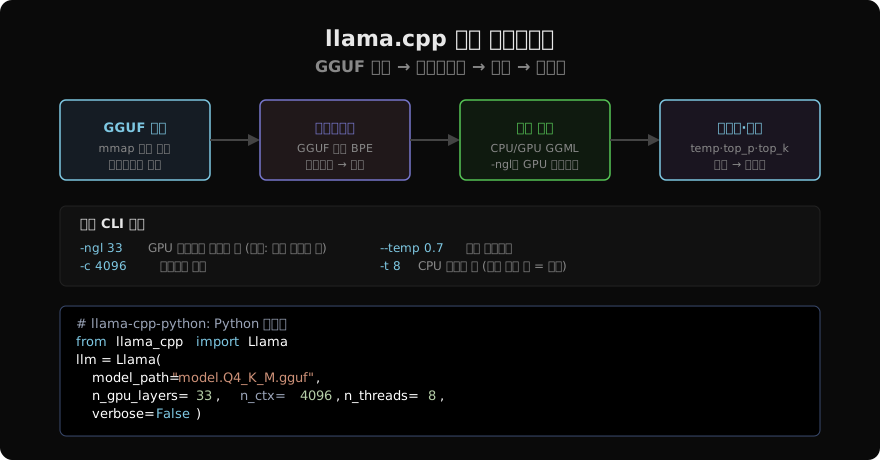
가장 먼저 만지는 것은 llama-cli다.
# 단발 생성
./build/bin/llama-cli \
  -m models/Meta-Llama-3.1-8B-Instruct-Q4_K_M.gguf \
  -p "한국의 전통 음식 5가지를 설명해줘" \
  -n 512

# 대화 모드 + GPU 오프로드
./build/bin/llama-cli \
  -m models/Meta-Llama-3.1-8B-Instruct-Q4_K_M.gguf \
  --chat-template llama3 \
  -c 8192 \
  -ngl 33 \
  --temp 0.7 --top-p 0.9 \
-i-n은 생성할 토큰 수, -c는 컨텍스트 길이, -i는 대화 모드다. 눈여겨볼 것은 --chat-template이다. 채팅 모델은 학습할 때 본 대화 형식이 정해져 있고, 역할 표시와 구분자가 그 형식과 어긋나면 답이 이상해진다 — 모델이 대화가 어디서 끝나는지 몰라 사용자 차례까지 혼자 이어 쓰는 식이다. GGUF 메타데이터에 템플릿이 들어 있으면 자동으로 잡히지만, 변환본에 따라 빠져 있기도 해서 답이 이상할 때 가장 먼저 볼 자리다.
성능 손잡이
레이어 오프로드
llama.cpp가 다른 엔진과 갈리는 가장 큰 특징이 부분 오프로드다. 모델 전체가 VRAM에 들어가야 GPU를 쓸 수 있는 것이 아니라, 레이어 단위로 몇 층까지만 GPU에 올리고 나머지는 CPU에 남겨 둘 수 있다. 그 층 수를 정하는 것이 -ngl이다.
숫자를 한 번 넣어 보자. Llama 3.1 8B는 트랜스포머 층이 32개이고 출력 층까지 세어 33으로 잡는다. Q4_K_M 파일이 4.6GB니까 한 층이 대략 140MB다. VRAM 4GB짜리 카드가 있다고 하면, 컨텍스트 8192의 KV 캐시 1GB와 여유 0.3GB를 빼고 2.7GB가 남는다. 2700을 140으로 나누면 19다 — 33층 중 19층을 GPU에, 나머지 14층을 CPU에 두는 설정이 이 기계의 답이다.
./build/bin/llama-server \
  -m models/Meta-Llama-3.1-8B-Instruct-Q4_K_M.gguf \
  -ngl 19 -c 8192
전부 올리고 싶으면 -ngl all이라고 적는다. 층 수보다 큰 숫자를 주는 옛 관례(-ngl 99)도 그대로 통해서 예제마다 그 표기가 많이 보이고, 값을 아예 안 주면 auto가 기본이라 들어가는 만큼만 알아서 올라간다. 반대로 숫자를 손으로 크게 잡아 VRAM이 모자라면 로드 중에 그대로 죽으므로, 직접 정할 때는 낮은 값에서 시작해 올리는 편이 빠르다.
방금 계산에서 1GB를 차지한 KV 캐시가 어디서 나온 값인지도 짚어 둔다. Llama 3.1 8B는 KV 헤드가 8개, 헤드 차원이 128이다. 토큰 하나가 층마다 K와 V를 개씩 남기므로 FP16이면 4KB, 32층이면 128KB다. 컨텍스트 8192를 꽉 채우면 1GB가 된다. 이 값은 컨텍스트 길이에 정비례해서 자란다 — -c를 32768로 올리면 KV 캐시만 4GB다. --cache-type-k q8_0으로 캐시를 8비트로 눌러 절반으로 줄일 수 있고, 그 대가와 원리는 KV 캐시 완전 해설과 KV 캐시 양자화에 있다.
스레드와 메모리 옵션
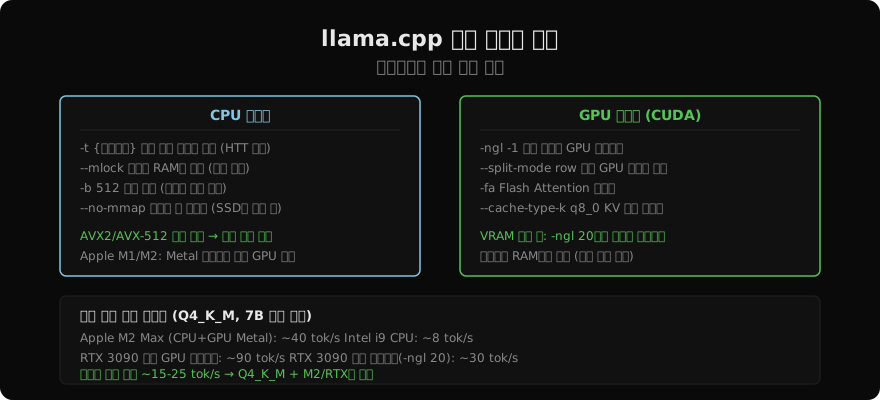
CPU 쪽 손잡이는 넷이다.
./build/bin/llama-cli -m models/Meta-Llama-3.1-8B-Instruct-Q4_K_M.gguf \
  -t 8 \          # 스레드 수 — 물리 코어 수에 맞춘다
  -b 512 \        # 프리필 배치 크기
  --mlock \       # 모델을 RAM에 고정, 스왑 방지
--no-mmap # 메모리 맵 끄기 (스토리지가 느릴 때)-t는 논리 코어가 아니라 물리 코어 수에 맞춘다. 앞에서 본 대로 이 작업의 천장이 메모리 대역폭이라, 하이퍼스레딩으로 스레드를 두 배 늘려 봤자 같은 메모리를 더 많은 스레드가 다투기만 한다. 8코어 16스레드 CPU에서 -t 16이 -t 8보다 느려지는 일이 드물지 않다.
--mlock은 모델이 차지한 페이지를 RAM에 못 박아 스왑으로 밀려나지 않게 한다. 메모리가 빠듯한 기계에서 답이 갑자기 몇 배 느려진다면 대개 모델 일부가 디스크로 밀려난 것이고, 이 플래그 하나가 그것을 막는다. --no-mmap은 반대로 파일을 전부 미리 읽어 들이는 쪽이다 — 로딩은 느려지지만 스토리지가 느린 기계에서는 이후가 안정된다. 최근 빌드는 이 둘을 --load-mode(-lm) 하나로 모으고 옛 이름은 그대로 두었다. --load-mode mlock과 --load-mode none이 각각 위 두 줄의 자리이고, mmap+mlock처럼 섞은 값도 받는다.
-b는 프리필 단계의 배치 크기다. 프롬프트를 한 번에 몇 토큰씩 처리할지 정하는 값이라 첫 글자까지의 시간에 영향을 주고, 생성 속도에는 거의 관계가 없다. GPU 쪽에는 다중 GPU에 레이어를 나누는 --split-mode row가 더 있다. Flash Attention을 켜고 끄는 -fa도 있는데 on·off·auto 셋을 받고 기본이 auto라, 쓸 수 있는 빌드에서는 적지 않아도 알아서 켜진다.
llama-bench
설정을 바꿨으면 재야 한다. llama-bench가 그 자리에 있다.
./build/bin/llama-bench \
  -m models/Meta-Llama-3.1-8B-Instruct-Q4_K_M.gguf \
  -ngl 99 -p 512 -n 128
결과가 두 줄로 나오는데, 이 둘을 하나의 「속도」로 뭉쳐서는 안 된다. pp는 프롬프트 512토큰을 읽어 들이는 프리필 속도이고, tg는 128토큰을 만들어 내는 디코드 속도다. 성격이 아예 다르다. 프리필은 여러 토큰을 한꺼번에 처리하는 행렬-행렬 곱이라 계산이 촘촘하게 들어차고, 디코드는 토큰 하나씩 처리하는 행렬-벡터 곱이라 가중치를 읽어 오는 시간이 대부분이다. 그래서 같은 기계에서 잰 pp 수치가 tg보다 훨씬 크게 나온다.
어느 쪽이 체감을 정하는지는 하는 일이 정한다. 짧은 질문을 던지고 답을 기다리는 챗봇은 tg가 전부다 — 글자가 나오는 속도가 눈으로 따라 읽는 속도를 넘어서면 답이 밀리지 않고 흐르고, 그 아래로 떨어지면 한 줄씩 기다리는 화면이 된다. 그 경계는 기계가 아니라 읽는 사람이 정하므로 자기 화면에서 한 번 재 보는 편이 정확하다. 반대로 긴 문서를 통째로 넣고 요약을 시키는 작업은 첫 글자가 나오기까지가 거의 전부 프리필이므로 pp가 체감을 정한다. 설정을 바꿔 가며 잴 때도 자기 용도에 맞는 쪽을 보고 정해야 한다.
Ollama 기본 사용
설치와 첫 모델
지금까지 한 일 — 소스 받기, 백엔드 정해 빌드, 모델 파일 내려받기, 경로 지정해 실행 — 을 Ollama는 두 줄로 줄인다.
curl -fsSL https://ollama.com/install.sh | sh   # macOS / Linux
ollama run llama3.1:8b
두 번째 줄 하나가 세 가지 일을 한다. 모델이 없으면 내려받고, 메모리에 올리고, 대화 프롬프트를 띄운다. Windows는 설치 파일을 받고, 컨테이너로 돌릴 수도 있다.
docker run -d -v ollama:/root/.ollama -p 11434:11434 --name ollama ollama/ollama

# NVIDIA GPU를 쓰려면
docker run -d --gpus=all -v ollama:/root/.ollama -p 11434:11434 --name ollama ollama/ollama
허브에 올라온 모델은 같은 방식으로 이름만 바꿔 부른다. Google gemma3:12b, Alibaba qwen2.5:14b, Microsoft phi4, mistral:7b, 추론에 특화된 deepseek-r1:8b, 이미지를 읽는 llava:13b가 있고, 코딩용으로 codellama:13b와 qwen2.5-coder:14b가 있다. 한국어 파인튜닝 모델도 올라와 있는데 — EEVE-Korean-Instruct-10.8B 계열이 대표적이다 — 커뮤니티가 올린 것은 이름 앞에 올린 사람의 네임스페이스가 붙는 경우가 많으니 ollama.com/library에서 정확한 태그를 확인하고 적는다.
태그와 양자화
llama.cpp에서 파일 이름이 하던 일을 Ollama에서는 태그가 한다.
ollama run llama3.1:8b                    # 기본 — Q4_K_M 계열
ollama run llama3.1:8b-instruct-q8_0      # 8비트, 고품질
ollama run llama3.1:8b-instruct-fp16      # 원본 정밀도, VRAM을 많이 쓴다
콜론 뒤가 세 조각으로 나뉘어 있다. 8b는 파라미터 수, instruct는 파인튜닝 종류, q8_0은 양자화 레벨이다. 같은 정보가 파일 이름 대신 태그에 들어갔을 뿐 고르는 기준은 앞에서 본 것과 똑같다.
태그를 생략하면 기본값이 조용히 정해진다는 점만 조심한다. llama3.1:8b가 오늘 가리키는 파일과 반년 뒤에 가리키는 파일이 같다는 보장이 없다. 개인 실험이라면 아무 문제가 없지만, 결과를 기록에 남기거나 팀에 나눠 주는 자리에서는 양자화 레벨까지 전부 적는다. 재현되지 않는 숫자는 없는 숫자와 같다.
모델 관리 명령
내려받은 것을 둘러보는 명령이 몇 개 더 있다.
ollama list                            # 설치된 모델
ollama ps                              # 지금 메모리에 올라와 있는 모델
ollama show llama3.1:8b                # 파라미터 수·크기 등 상세
ollama show llama3.1:8b --modelfile    # 이 모델의 Modelfile 전문
ollama show llama3.1:8b --parameters   # 샘플링 파라미터 기본값
ollama rm llama3.1:8b                  # 삭제
ollama pull gemma3:12b                 # 내려받기만
이 중 실제로 자주 쓰게 되는 것은 --modelfile이다. 허브 모델이 어떤 시스템 프롬프트와 어떤 대화 템플릿을 들고 있는지 그대로 찍어 준다. llama.cpp에서 --chat-template을 손으로 맞춰야 했던 그 정보가 여기서는 모델에 함께 딸려 오고, 내용을 눈으로 확인할 수도 있다. 그리고 이 출력이 다음 절에서 만들 커스텀 모델의 출발점이 된다 — 처음부터 쓰지 말고 받아 온 것을 고치는 편이 훨씬 안전하다.
ollama ps가 방금 돌린 모델을 안 보여 준다면 고장이 아니다. 데몬은 한동안 요청이 없는 모델을 메모리에서 내린다. 다음 요청이 오면 다시 올리므로 동작에는 문제가 없지만, 그 요청 하나는 로딩 시간을 통째로 뒤집어쓴다. llama.cpp에서는 내가 서버를 띄운 동안 모델이 그대로 올라가 있는데, 여기서는 그 수명을 도구가 정한다. 앞의 표에서 「프로세스」 줄이 가리킨 것이 이 차이다.
Modelfile
Ollama가 llama.cpp 위에 얹은 것 중 가장 성격이 뚜렷한 것이 Modelfile이다. 기반 모델에 시스템 프롬프트와 샘플링 파라미터를 박아 새 이름의 모델로 만든다.
FROM llama3.1:8b

SYSTEM """
당신은 한국의 스타트업 생태계 전문가입니다.
항상 한국어로 답변하고, 구체적인 사례와 데이터를 인용하세요.
답변은 명확한 구조(도입-본론-결론)를 따르세요.
"""

PARAMETER temperature 0.5
PARAMETER top_p 0.9
PARAMETER num_ctx 8192
PARAMETER num_predict 1024
ollama create startup-expert -f Modelfile
ollama run startup-expertPARAMETER의 이름이 llama.cpp의 플래그와 대응한다. num_ctx가 -c, num_predict가 -n이고 temperature와 top_p는 이름이 그대로다. 다만 여기 적을 수 있는 것은 Ollama가 노출하기로 한 목록뿐이다. 앞 절에서 본 --mlock이나 --cache-type-k 같은 저수준 손잡이는 이 목록에 없다. 표에서 「옵션」 줄이 가리킨 것이 이것이고, 로컬 실험에서는 거의 걸리지 않다가 메모리를 짜내야 하는 자리에서 갑자기 벽으로 나타난다.
대신 얻는 것이 분명하다. llama.cpp에서 시스템 프롬프트와 온도는 호출할 때마다 넘기는 값이라, 팀원 셋이 같은 모델을 다르게 쓰는 것을 막을 방법이 없다. Modelfile로 굳혀 두면 그 설정이 모델의 일부가 되고, 파일 한 장을 나눠 주면 누가 실행해도 같은 것이 만들어진다.
로컬 GGUF 파일도 FROM에 그대로 쓸 수 있다.
FROM ./my-finetuned-model-Q4_K_M.gguf

SYSTEM "당신은 내부 업무 보조 AI입니다."
PARAMETER temperature 0.3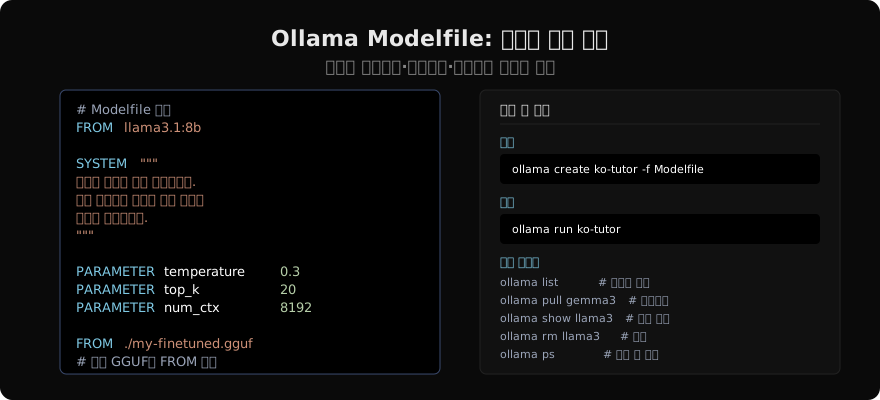
서버와 클라이언트
HTTP 서버
여기서부터는 두 도구가 거의 같아진다. 둘 다 OpenAI 호환 HTTP 서버를 내주기 때문이다. 다른 것은 그 서버가 어떻게 뜨느냐뿐이다.
# llama.cpp — 내가 띄운다
./build/bin/llama-server \
  -m models/Meta-Llama-3.1-8B-Instruct-Q4_K_M.gguf \
  -ngl 99 -c 8192 \
  --host 0.0.0.0 --port 8080 \
  --parallel 4
Ollama 쪽은 이 줄에 해당하는 일을 설치가 미리 해 둔다. 데몬이 11434 포트에 이미 떠 있고 — 손으로 띄울 때 쓰는 ollama serve가 그 자리다 — 모델은 첫 요청이 올 때 올라간다.
--parallel은 동시에 처리할 요청 슬롯 수인데, 여기에 함정이 하나 있다. -c로 준 컨텍스트를 슬롯들이 나눠 갖는다. -c 8192 --parallel 4로 띄우면 요청 하나가 쓸 수 있는 컨텍스트가 2048로 줄어든다. 긴 프롬프트를 넣었을 때 앞부분이 잘려 나가는데 오류는 안 나므로, 답이 프롬프트 앞쪽을 무시하는 것처럼 보이면 여기를 본다. 슬롯 수를 올릴 때는 -c도 함께 올려야 하고, 그러면 KV 캐시 메모리도 그만큼 늘어난다.
REST 엔드포인트는 이렇게 갈린다.
# 둘 다 여는 OpenAI 호환 경로 (llama-server라면 포트가 8080)
curl http://localhost:11434/v1/chat/completions \
  -H "Content-Type: application/json" \
  -d '{"model": "llama3.1:8b", "messages": [{"role": "user", "content": "안녕하세요!"}]}'

# Ollama 고유 경로
curl http://localhost:11434/api/generate \
  -H "Content-Type: application/json" \
-d '{"model": "llama3.1:8b", "prompt": "서울의 가볼 만한 곳 5가지", "stream": false}'/v1/...은 양쪽 다 열려 있고 /api/...는 Ollama에만 있다. 특별한 이유가 없으면 /v1 쪽을 쓴다 — 나중에 서버를 갈아 끼울 때 클라이언트 코드를 안 고쳐도 된다.
OpenAI SDK 연결
그래서 파이썬에서는 OpenAI SDK를 그대로 쓴다. 바꾸는 것은 한 줄뿐이다.
from openai import OpenAI

client = OpenAI(
    base_url="http://localhost:11434/v1",   # llama-server라면 :8080/v1
    api_key="ollama",                       # 검사하지 않는다
)

response = client.chat.completions.create(
    model="qwen2.5:14b",
    messages=[
        {"role": "system", "content": "당신은 친절한 AI 어시스턴트입니다."},
        {"role": "user", "content": "Python에서 async/await를 설명해줘"},
    ],
    max_tokens=500,
    temperature=0.7,
    stream=True,
)
for chunk in response:
    if chunk.choices[0].delta.content:
        print(chunk.choices[0].delta.content, end="", flush=True)
같은 코드가 두 서버에서 다르게 도는 자리가 딱 하나 있다. model 필드다. llama-server는 뜰 때 -m으로 받은 모델 하나만 들고 있으므로 이 값을 무시한다 — 아무 문자열이나 넣어도 되고, 그래서 오타가 있어도 조용히 돈다. Ollama는 이 값으로 모델을 고르고, 갖고 있지 않은 이름이면 404와 함께 「model not found」를 돌려준다 — 내려받기는 ollama run이나 ollama pull이 하는 일이지 API가 대신 해 주지 않는다. 모델 이름을 틀렸을 때 한쪽은 아무 일도 없이 답이 나오고 다른 쪽은 그 자리에서 404가 나는 셈이라, 서버를 바꿔 붙일 때 이 자리를 먼저 확인한다.
api_key도 짚어 둔다. 아무 값이나 통과한다는 것은 인증이 없다는 뜻이다. --host 0.0.0.0으로 열어 두면 같은 네트워크의 누구나 그 모델을 쓸 수 있다. 로컬 개발이라면 127.0.0.1에 묶어 두고, 밖에 내보내야 한다면 앞에 인증하는 프록시를 세운다.
llama-cpp-python
HTTP를 거치지 않고 파이썬 프로세스 안에서 직접 모델을 부르는 길이 llama.cpp에는 하나 더 있다. llama-cpp-python 바인딩이다.
pip install llama-cpp-python                                    # CPU
CMAKE_ARGS="-DGGML_CUDA=on" pip install llama-cpp-python --force-reinstall
CMAKE_ARGS="-DGGML_METAL=on" pip install llama-cpp-python --force-reinstall
설치할 때도 백엔드를 정한다는 점이 소스 빌드와 똑같다. pip install로 끝내면 CPU 전용이 깔리므로 GPU를 쓰려면 CMAKE_ARGS를 붙여 다시 깔아야 한다.
from llama_cpp import Llama

llm = Llama(
    model_path="models/Meta-Llama-3.1-8B-Instruct-Q4_K_M.gguf",
    n_gpu_layers=-1,     # -1이면 전부 GPU로
    n_ctx=8192,
    n_batch=512,
    n_threads=8,
    flash_attn=True,     # CUDA/Metal 빌드에서만
    verbose=False,
)

response = llm.create_chat_completion(
    messages=[{"role": "user", "content": "비트코인을 쉽게 설명해줘"}],
    max_tokens=300,
    stream=True,
)
for chunk in response:
    content = chunk["choices"][0]["delta"].get("content", "")
    if content:
        print(content, end="", flush=True)
생성자 인자가 CLI 플래그와 하나씩 대응한다 — n_gpu_layers가 -ngl, n_ctx가 -c, n_batch가 -b, n_threads가 -t다. 여기서는 층 수를 셀 필요 없이 -1로 전부 올리라고 적을 수 있다.
얻는 것은 HTTP 왕복 한 단계가 사라지는 것이고, 잃는 것은 격리다. 모델이 프로세스 안에 있으므로 웹 워커를 넷 띄우면 모델도 넷 올라간다. 4.6GB짜리가 넷이면 18GB다. 워커를 여럿 두는 서버라면 오히려 llama-server를 하나 띄우고 HTTP로 붙는 쪽이 메모리를 아낀다.
Ollama에는 이 길이 없다. 파이썬 SDK가 있긴 하지만 결국 11434 데몬을 부르는 HTTP 클라이언트라, 모델은 언제나 별도 프로세스에 있다.
import ollama

for chunk in ollama.chat(
    model="llama3.1:8b",
    messages=[{"role": "user", "content": "머신러닝이란?"}],
    stream=True,
):
    print(chunk["message"]["content"], end="", flush=True)

embeddings = ollama.embeddings(model="nomic-embed-text", prompt="서울은 대한민국의 수도입니다.")
print(f"벡터 차원: {len(embeddings['embedding'])}")   # 768
마지막 두 줄이 덤으로 딸려 오는 것 하나를 보여 준다. 임베딩 모델도 같은 방식으로 받아 같은 데몬에서 돌릴 수 있다. nomic-embed-text는 768차원 벡터를 내주고, 검색용 인덱스를 로컬에서 만들 때 생성 모델과 한 프로세스를 나눠 쓴다.
멀티모달 입력
멀티모달도 양쪽 다 된다. 다만 준비 과정이 눈에 띄게 다르다.
llama.cpp에서는 파일을 둘 받아야 한다. 언어 모델 GGUF와, 이미지 인코더의 출력을 언어 모델의 임베딩 공간으로 옮겨 주는 작은 가중치인 프로젝터다. 이것이 --mmproj로 주는 파일이다.
ls build/bin/ | grep -iE 'llava|mtmd'    # 실행 파일 이름을 먼저 확인한다

./build/bin/llama-mtmd-cli \
  -m models/llava-1.6-mistral-7b-Q4_K_M.gguf \
  --mmproj models/llava-1.6-mistral-7b-mmproj.gguf \
  --image photo.jpg \
  -p "이 이미지에 무엇이 있나요?" \
  -ngl 99
멀티모달 CLI의 실행 파일 이름은 버전을 탄다. 예전에는 모델 계열마다 실행 파일이 따로 있었고 뒤에 하나로 합쳐졌으므로, 빌드한 버전의 build/bin/을 먼저 확인하고 이름을 맞춘다. 옵션의 모양(--mmproj와 --image)은 그대로다.
파이썬 바인딩에서는 프로젝터를 챗 핸들러에 물린다.
from llama_cpp import Llama
from llama_cpp.llama_chat_format import Llava16ChatHandler

llm = Llama(
    model_path="models/llava-1.6-mistral-7b-Q4_K_M.gguf",
    chat_handler=Llava16ChatHandler(clip_model_path="models/llava-1.6-mistral-7b-mmproj.gguf"),
    n_ctx=4096,
    n_gpu_layers=-1,
)
response = llm.create_chat_completion(messages=[{
    "role": "user",
    "content": [
        {"type": "image_url", "image_url": {"url": "photo.jpg"}},
        {"type": "text", "text": "이 사진을 설명해줘"},
    ],
}])
Ollama 쪽은 이 두 파일 이야기가 통째로 사라진다. 태그가 프로젝터까지 들고 있어서 llava:13b 하나를 받으면 끝이고, 요청에 base64로 인코딩한 이미지를 images에 넣기만 하면 된다.
import ollama, base64

with open("photo.jpg", "rb") as f:
    img_b64 = base64.b64encode(f.read()).decode()

response = ollama.chat(model="llava:13b", messages=[{
    "role": "user",
    "content": "이 이미지에 있는 텍스트를 모두 추출해줘",
    "images": [img_b64],
}])
print(response["message"]["content"])
파일 두 개를 짝 맞춰 받는 일과 실행 파일 이름을 확인하는 일이 통째로 없어졌다. 이 절이 「감싼 것을 쓴다」가 무엇을 벌어 주는지 가장 선명하게 보여 주는 자리다.
자체 모델과 통합
GGUF 변환과 양자화
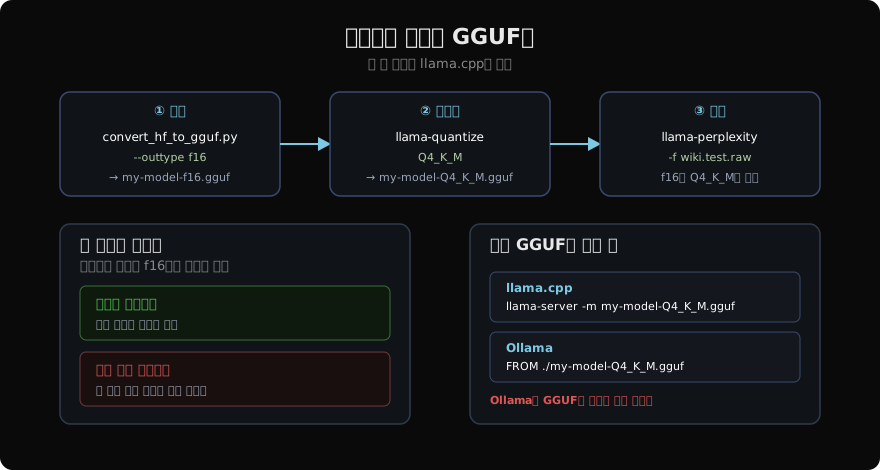
직접 파인튜닝한 모델을 로컬에서 돌리려면 먼저 GGUF로 옮겨야 한다. 이 일은 llama.cpp만 한다.
python convert_hf_to_gguf.py ./my-finetuned-model/ \
  --outtype f16 --outfile my-model-f16.gguf

./build/bin/llama-quantize my-model-f16.gguf my-model-Q4_K_M.gguf Q4_K_M

./build/bin/llama-perplexity -m my-model-Q4_K_M.gguf \
  -f wikitext-2-raw/wiki.test.raw --chunks 50
세 단계다. 먼저 FP16 GGUF로 변환하고, 거기서 원하는 레벨로 양자화하고, 품질이 얼마나 상했는지 잰다. 마지막 줄의 퍼플렉시티는 모델이 다음 토큰을 얼마나 헤매는지를 재는 값으로 낮을수록 좋다. 이 단계를 건너뛰기 쉬운데 그러면 안 된다. 퍼플렉시티의 절대값은 데이터셋마다 다르므로 그 숫자 자체는 뜻이 없고, f16 파일과 양자화 파일을 같은 데이터로 재서 그 차이를 봐야 한다. 그래서 마지막 명령은 -m만 f16 파일로 바꿔 한 번 더 돌리고 두 숫자를 견준다. 차이가 미미하면 안심하고 작은 파일을 쓰고, 눈에 띄게 벌어지면 한 단계 높은 레벨로 다시 양자화한다.
만든 GGUF를 Ollama에 넣는 것은 앞에서 본 FROM ./my-model-Q4_K_M.gguf 한 줄이다. 여기가 「감싼 것을 쓴다」가 끝나는 지점이라는 점을 분명히 해 둔다. Ollama는 GGUF를 만들어 주지 않는다. 허브에 없는 모델을 쓰려는 순간 llama.cpp 도구 모음으로 한 번은 내려와야 하고, 그렇다면 그 도구는 어차피 빌드되어 있어야 한다.
UI와 프레임워크
서버가 OpenAI 호환이라는 사실은 위에 얹는 층에서도 그대로 값을 한다. ChatGPT 비슷한 화면을 원하면 Open WebUI를 컨테이너로 띄워 붙인다.
docker run -d -p 3000:8080 \
  --add-host=host.docker.internal:host-gateway \
  -v open-webui:/app/backend/data \
  --name open-webui ghcr.io/open-webui/open-webui:main
프레임워크도 마찬가지다. LangChain에는 전용 통합이 있다.
from langchain_ollama import ChatOllama

llm = ChatOllama(model="llama3.1:8b", temperature=0.7)
for chunk in llm.stream("한국의 IT 산업 현황은?"):
    print(chunk.content, end="", flush=True)
같은 UI와 프레임워크를 llama-server에도 붙일 수 있다. OpenAI 호환 엔드포인트를 가리키게만 하면 된다. 다만 한 가지가 빠진다 — 모델 목록과 전환이다. Ollama는 어떤 모델을 갖고 있는지 API로 알려 주고 요청마다 다른 모델을 골라 주지만, -m으로 띄운 llama-server는 그 모델 하나뿐이다. 화면에서 모델을 골라 가며 비교하고 싶다면 이 차이가 그대로 드러난다.
선택 기준
정리하면 결정은 하나다. 편의 쪽 손잡이는 Ollama가 이미 다 쥐고 있으므로, 엔진을 직접 쥘 이유가 있는지만 보면 된다.
| 상황 | 고르는 것 |
|---|---|
| 노트북에 처음 로컬 모델을 올린다 | Ollama |
| 여러 모델을 갈아 끼우며 비교한다 | Ollama |
| 같은 설정을 팀에 나눠 준다 | Ollama (Modelfile) |
| VRAM이 빠듯해 오프로드 층 수를 맞춘다 | llama.cpp |
| 파인튜닝 모델을 GGUF로 만든다 | llama.cpp |
| 엔진 버전을 커밋 단위로 고정한다 | llama.cpp |
| 캐시 양자화까지 짜내야 한다 | llama.cpp |
| 동시 요청이 꾸준히 들어온다 | 둘 다 아니다 |
앞의 여섯 줄은 서로 배타적이지 않다. Ollama로 시작해 막히는 자리에서만 내려오는 순서가 대개 맞다. 모델을 고르고 프롬프트를 다듬는 동안에는 손잡이가 필요 없고, 필요해지는 시점은 대체로 「이 기계에 안 들어간다」거나 「이 파일이 허브에 없다」일 때다. 그리고 그때 내려와도 잃는 것이 없다 — 두 도구가 같은 GGUF 파일과 같은 OpenAI 호환 인터페이스를 쓰므로, 모델도 클라이언트 코드도 그대로 쓰인다.
마지막 줄만 성격이 다르다. 이 글의 두 도구는 요청 하나를 잘 처리하도록 만들어진 것이지 여럿을 동시에 감당하도록 만들어진 것이 아니다. --parallel로 슬롯을 늘려도 컨텍스트를 나눠 갖는 구조라 금방 벽에 닿고, 요청이 겹치는 만큼 서로를 기다린다. 그 자리에서 필요한 것은 배치를 걸음마다 다시 짜고 KV 캐시를 페이지 단위로 굴리는 서버용 엔진이다 — 연속 배칭과 vLLM에서 그 원리를 다뤘다.
다음 글은 그 반대쪽 끝으로 간다. 노트북이 아니라 GPU 서버 한 대에 요청이 몰려 들어오는 상황을 놓고, Hugging Face가 자기 생태계 위에 세운 프로덕션 서빙 스택이 그 자리를 어떻게 맡는지를 본다. 모델을 파일로 다루던 이 글과 달리 거기서는 모델이 저장소 이름으로 불리고, 텐서 병렬과 양자화가 서버 인자 몇 개로 정리된다.
읽어주셔서 감사합니다. 😊