

지난 글에서 고객 지원 자동화를 구현했다. 이번에는 콘텐츠 생성 자동화를 다룬다. 마케팅 블로그 포스트, 제품 설명, 이메일 뉴스레터처럼 반복해서 만들어야 하는 텍스트를 파이프라인으로 처리하는 방법이다. 어려운 것은 문장을 만들어 내는 일이 아니다 — 그건 모델이 이미 잘한다. 어려운 것은 3,000자쯤 되는 글에서 앞뒤가 어긋나지 않게 하는 것, 브랜드 목소리를 흔들리지 않게 하는 것, 그리고 틀린 사실이 자동으로 발행되지 않게 하는 것이다.
단발 생성의 한계
초안의 첫인상
가장 먼저 해 보게 되는 것은 「이 주제로 3,000자 블로그 글을 써 줘」다. 결과물은 놀랍게도 읽을 만하다. 문장이 매끄럽고 소제목도 붙어 있고, 처음 열 줄만 보면 사람이 쓴 것과 구분하기 어렵다. 그래서 이 단계에서 「자동화 다 됐다」고 판단하는 일이 흔하다.
문제는 그 글을 처음부터 끝까지, 두 번 읽었을 때 드러난다. 한 번 읽을 때는 문장 단위로 읽히므로 걸리는 것이 없는데, 글 전체를 하나로 놓고 보면 같은 말이 세 번 나오고 앞뒤 조언이 어긋나 있고 뒤쪽 절이 텅 비어 있다. 모델이 못 쓰는 것이 아니라, 3,000자짜리 구조를 한 번의 생성 안에서 관리하지 못하는 것이다. 그리고 검수하는 사람도 한 번은 읽지만 두 번은 잘 안 읽기 때문에, 이 결함들은 대개 발행된 뒤에 발견된다.
반복·모순·뒷심
첫째, 반복이다. 도입에서 「AI 도입의 핵심은 데이터 품질입니다」라고 쓰고, 두 번째 절에서 거의 같은 문장을 다시 쓰고, 결론에서 세 번째로 쓴다. 모델이 앞에서 무슨 말을 했는지 기억은 하지만, 「이미 말했으니 다른 것을 말하자」는 판단은 잘 하지 않는다. 각 절이 독립적으로 그럴듯해지려다 보니 매번 핵심 주장을 다시 꺼낸다.
둘째, 모순이다. 앞에서 「소규모 팀은 외부 API로 시작하는 편이 낫습니다」라고 써 놓고 뒤에서 「비용 관리를 위해 처음부터 자체 모델을 두는 것이 좋습니다」라고 쓴다. 둘 다 맞는 말이라 각각을 볼 때는 걸리지 않는데, 한 글 안에 있으면 독자가 무엇을 하라는 것인지 알 수 없다.
셋째, 뒷심이다. 첫 절은 예시가 둘씩 붙어 있고 문단이 촘촘한데, 마지막 절로 갈수록 문장이 짧아지고 「이처럼 다양한 방법이 있습니다」 같은 껍데기 문장이 늘어난다. 남은 출력 토큰을 의식한 결과이기도 하고, 아직 안 쓴 것을 다 담으려다 목록만 나열하게 되는 탓이기도 하다.
단계 분할
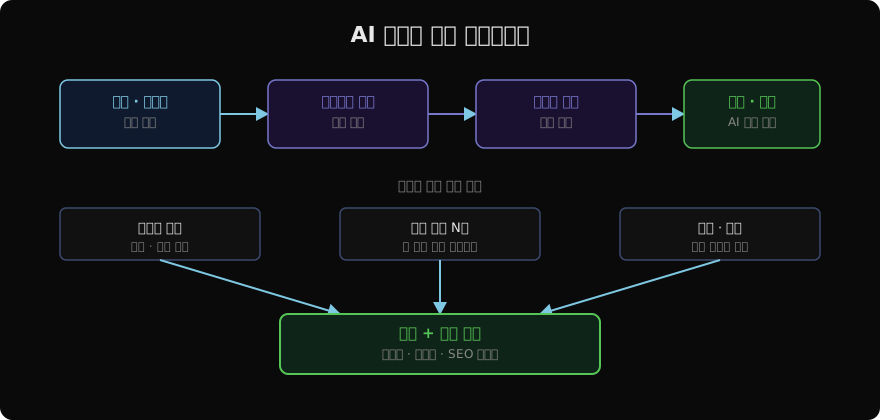
셋 다 「글 전체를 한 번의 생성으로 만든다」는 구조에서 나온다. 그래서 단계를 나눈다.
- 아웃라인 생성 — 무엇을 어느 절에서 말할지 먼저 정한다
- 절별 작성 — 정해진 것만 쓴다
- 통합과 편집 — 절 사이의 이음매를 다듬는다
- 품질 검토 — 정해 둔 기준으로 검사한다
이렇게 하면 반복은 1단계에서, 모순은 3단계에서, 뒷심은 2단계에서 갈린다. 각 문제를 잡는 자리가 서로 다르다는 것이 파이프라인을 나누는 진짜 이유다. 「단계를 나누면 품질이 좋아진다」가 아니라, 나눠야 각 결함에 대응하는 검사를 붙일 수 있다.
아웃라인
생성 호출
아웃라인은 절 제목과 각 절에서 다룰 핵심 포인트를 구조화된 형태로 받는다.
import anthropic
import json

client = anthropic.Anthropic()

def generate_outline(
    topic: str,
    keywords: list[str],
    tone: str = "professional",
    target_length: str = "1500 words",
) -> dict:
    keywords_str = ", ".join(keywords)
    response = client.messages.create(
        model="claude-opus-4-7",
        max_tokens=1024,
        system=(
            "당신은 SEO에 최적화된 블로그 아웃라인을 작성하는 전문가입니다. "
            f"톤: {tone}. "
            "JSON으로만 응답하세요."
        ),
        messages=[
            {
                "role": "user",
                "content": (
                    f"주제: {topic}\n"
                    f"키워드: {keywords_str}\n"
                    f"목표 길이: {target_length}\n\n"
                    "다음 형식으로 아웃라인을 작성하세요:\n"
                    '{"thesis": "이 글이 주장하는 한 문장",'
                    ' "sections": [{"heading": "...", "key_points": ["..."],'
                    ' "not_here": ["이 절에서 다루지 않을 것"]}]}'
                ),
            }
        ],
    )
    return json.loads(response.content[0].text)
두 필드가 추가되어 있다. thesis는 「이 글이 결국 무엇을 주장하는가」를 한 문장으로 적게 하는 칸이고, not_here는 다른 절에 넘길 내용을 명시적으로 적어 두는 칸이다. 이 둘이 뒤에서 반복과 나열을 막는 재료가 된다.
실패 유형
아웃라인도 실패한다. 그리고 아웃라인이 실패하면 뒤 단계가 아무리 잘 돌아도 결과가 나빠진다. 자주 나오는 것이 셋이다.
절 사이 중복이 첫째다. 「도입 방법」과 「실무 적용 사례」와 「시작하기」가 나란히 있는 아웃라인이 흔히 나온다. 제목은 다른데 담을 내용이 같다. 절 제목만 훑으면 그럴듯해 보이므로 이 단계에서 놓치기 쉽고, 결과물에서 반복으로 나타난 뒤에야 「아, 아웃라인이 문제였구나」를 알게 된다.
논지 없는 나열이 둘째다. 「장점」·「단점」·「사례」·「전망」처럼 어느 주제에나 붙일 수 있는 절 제목만 늘어선 경우다. 이런 아웃라인은 thesis를 요구하면 바로 드러난다 — 주장이 「AI는 중요합니다」처럼 나오면 그 글은 할 말이 없는 것이다.
결론 없는 마무리가 셋째다. 마지막 절이 「앞으로의 과제」거나 「마치며」인데 key_points가 「지속적인 관심이 필요하다」 하나뿐인 경우다. 이 아웃라인으로 글을 쓰면 마지막 절이 앞의 내용을 다시 요약하는 것으로 채워진다. 독자가 글을 덮고 무엇을 할지가 안 적혀 있으니 마케팅 글로서는 가장 중요한 자리가 비는 셈이다.
검사 규칙
이 셋은 모델에 다시 물어보지 않고 규칙으로 잡을 수 있다. 사람이 세 줄로 판단하는 것을 코드가 세 줄로 판단한다.
| 검사 | 조건 | 걸리면 |
|---|---|---|
| 절 사이 중복 | 두 절의 key_points 임베딩 유사도가 임계값 이상 | 절 병합을 요청하며 재생성 |
| 논지 없음 | thesis에 주제 낱말 외의 술어가 없음 |
주장을 구체화해 재생성 |
| 절 깊이 부족 | key_points가 2개 미만인 절이 있음 | 그 절만 보강 요청 |
| 결론 부재 | 마지막 절의 key_points에 수치·행동·판단이 없음 | 마지막 절 재작성 |
임계값은 손으로 정한다. 아웃라인 20개를 만들어 사람이 「이 둘은 겹친다」고 판단한 짝의 유사도를 재 보고, 그 아래에서 자르면 된다. 주제 영역마다 적정 값이 다르므로 한 번 정하고 끝내지 말고, 중복이 통과해서 나간 글이 보이면 그 짝의 유사도를 확인해 값을 조정한다. 검사가 걸렸을 때 글 전체를 다시 만들지 않고 문제가 난 절만 다시 요청하는 것이 중요하다. 전체 재생성은 멀쩡했던 절까지 바꿔 놓는다.
병렬 작성
절별 동시 호출
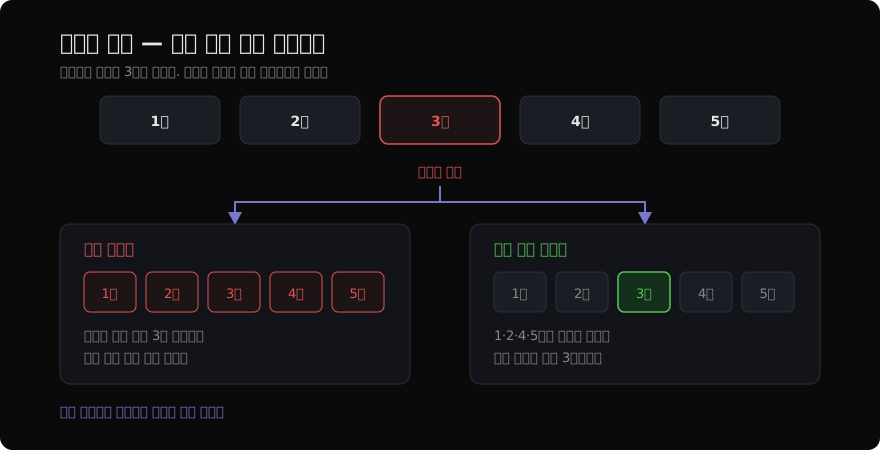
아웃라인이 통과하면 각 절을 독립적으로 작성한다. 절 사이에 의존성이 없으므로 동시에 호출할 수 있다.
import asyncio
import anthropic

async_client = anthropic.AsyncAnthropic()

async def write_section(
    section: dict,
    context: str,
    style_guide: str,
) -> str:
    heading = section["heading"]
    key_points = "\n".join(f"- {p}" for p in section["key_points"])
    not_here = "\n".join(f"- {p}" for p in section.get("not_here", []))

    response = await async_client.messages.create(
        model="claude-opus-4-7",
        max_tokens=800,
        system=f"당신은 전문 콘텐츠 작가입니다.\n{style_guide}",
        messages=[
            {
                "role": "user",
                "content": (
                    f"전체 글 맥락:\n{context}\n\n"
                    f"이번 절 제목: {heading}\n"
                    f"다룰 핵심 포인트:\n{key_points}\n\n"
                    f"이 절에서 다루지 않을 것:\n{not_here}\n\n"
                    "위 포인트를 자연스럽게 풀어 200~300단어로 작성하세요.\n"
                    "글 전체의 도입이나 결론을 여기서 쓰지 마세요."
                ),
            }
        ],
    )
    return f"## {heading}\n\n{response.content[0].text}"

async def write_all_sections(outline: dict, style_guide: str) -> list[str]:
    context = f"글 제목: {outline['title']}\n논지: {outline['thesis']}"
    tasks = [
        write_section(section, context, style_guide)
        for section in outline["sections"]
    ]
    return await asyncio.gather(*tasks)
절이 다섯이면 순차 처리 대비 벽시계 시간이 거의 5분의 1로 줄어든다. 여기까지가 이득이고, 대가는 그다음부터다.
절 사이의 불일치
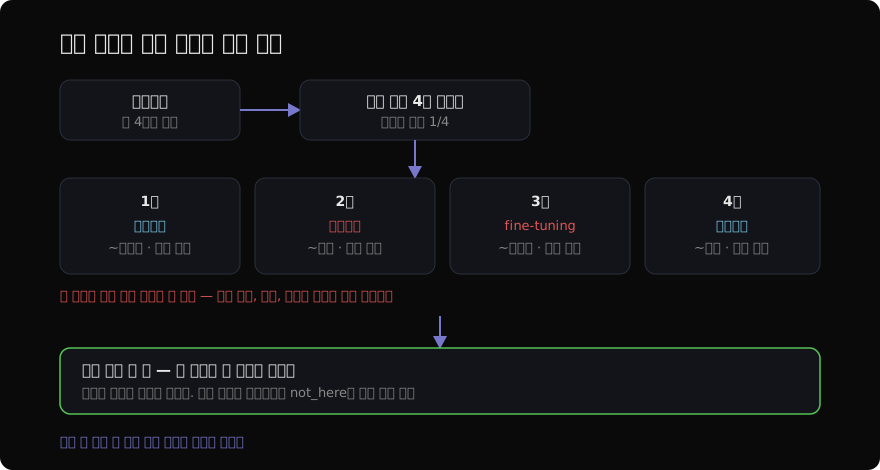
절을 따로 쓴다는 것은 각 호출이 다른 절의 실제 문장을 못 본다는 뜻이다. 그래서 셋이 샌다.
용어 표기가 먼저다. 한 절은 「파인튜닝」, 다른 절은 「미세조정」, 또 다른 절은 「fine-tuning」을 쓴다. 세 절을 이어 붙이면 같은 것을 세 이름으로 부르는 글이 된다.
인칭과 어미가 그다음이다. 어떤 절은 「~합니다」, 어떤 절은 「~한다」로 끝난다. 스타일 가이드에 적어 두어도 절마다 조금씩 흔들리고, 절 안에서 섞이는 경우도 있다.
예시 중복이 가장 눈에 띈다. 절 셋이 나란히 「예를 들어 고객 지원 챗봇을 생각해 봅시다」로 시작한다. 각 절 입장에서는 가장 자연스러운 예시를 고른 것이고, 하필 그게 같은 것이다. 독자에게는 글쓴이가 아는 사례가 하나뿐인 것처럼 읽힌다.
맥락 전달 비용
가장 흔한 처방은 앞 절의 요약을 다음 절 프롬프트에 넣는 것이다. 그런데 이렇게 하면 병렬이 아니게 된다 — 앞 절이 끝나야 다음 절을 시작할 수 있으니 순차 처리로 돌아가고, 속도 이득이 사라진다.
값을 치르는 방식을 셋 중에서 고른다.
| 방식 | 속도 | 잡히는 것 | 남는 것 |
|---|---|---|---|
| 완전 병렬 | 가장 빠름 | 없음 | 용어·어미·예시 전부 |
| 병렬 + 통합 편집 한 번 | 빠름 | 용어·어미 | 예시 중복 일부 |
| 앞 절 요약 전달(순차) | 느림 | 대부분 | 절 길이 편차 |
실무에서 쓸 만한 것은 가운데다. 절을 전부 병렬로 쓰고, 이어 붙인 다음, 통합 편집을 한 번 돌린다. 통합 편집 호출에는 글 전체가 들어가므로 용어 통일과 어미 정리를 한 번에 할 수 있고, 호출이 한 번 늘 뿐 병렬 이득은 그대로다. 예시 중복은 편집 단계에서 전부 잡히지는 않으니, 아웃라인의 not_here에 「이 절에서 쓸 예시」를 미리 갈라 적어 두면 상당 부분 예방된다.
스타일 가이드
금지어 목록
브랜드 목소리를 지키려고 가장 먼저 쓰는 것이 금지어 목록이다. 「'혁신적인', '획기적인', '패러다임'을 쓰지 마세요」 같은 줄이다. 이건 어느 정도 듣는다 — 그 낱말은 실제로 줄어든다. 문제는 모델이 금지어를 피해 같은 뜻의 다른 낱말로 옮겨 간다는 것이다. 「혁신적인」이 「새로운 차원의」가 되고, 「획기적인」이 「기존과는 다른」이 된다. 문장의 공허함은 그대로다.
낱말이 아니라 문장의 모양이 문제이기 때문이다. 그리고 문장의 모양은 목록으로 설명하기 어렵다. 「구체적으로 쓰세요」라는 지시가 왜 안 듣는지도 같은 이유다 — 무엇이 구체적인지는 보여 줘야 안다.
예시 쌍
그래서 스타일 가이드를 규칙이 아니라 예시 쌍으로 준다. 대여섯 쌍이면 충분하다.
| 나쁜 문장 | 고친 문장 |
|---|---|
| 이 기능은 업무 효율을 획기적으로 개선합니다 | 승인 단계가 셋에서 하나로 줄어듭니다 |
| 다양한 산업에서 활발히 활용되고 있습니다 | 제조·물류·보험 세 업종에서 쓰입니다 |
| 최적화된 알고리즘을 통해 성능이 향상됩니다 | 같은 서버로 초당 요청을 두 배 받습니다 |
| 사용자 경험이 크게 개선될 것으로 기대됩니다 | 첫 화면이 뜨기까지 2초에서 0.6초가 됩니다 |
| 도입을 검토해 보시기 바랍니다 | 30일 무료 계정으로 먼저 재 보세요 |
이 표를 시스템 프롬프트에 그대로 넣으면 금지어 목록보다 훨씬 잘 듣는다. 짝을 보면 규칙이 저절로 읽히기 때문이다 — 왼쪽은 형용사로 말하고 오른쪽은 숫자로 말한다. 모델은 그 패턴을 새 문장에 적용한다. 가르치려는 것이 규칙일 때는 규칙을 적고, 감각일 때는 예시를 준다.
가이드의 크기
스타일 가이드는 모든 절 호출에 들어가므로 길수록 비용이 는다. 절이 다섯이고 하루에 글 스무 편을 만든다면 같은 가이드가 하루 100번 실린다. 그리고 길어질수록 뒤쪽 항목이 덜 지켜진다 — 스무 줄짜리 가이드의 열여덟 번째 줄은 있으나 마나 한 경우가 많다.
대여섯 쌍에 어조·문장 길이·독자 호칭 정도의 짧은 규칙 몇 줄이면 된다. 더 늘리고 싶어지면 늘리는 대신 예시 쌍을 더 좋은 것으로 바꾼다. 발행된 글에서 편집자가 실제로 고친 문장이 가장 좋은 재료다 — 사람이 손댄 자리가 곧 가이드가 아직 못 잡고 있는 자리이기 때문이다. 한 달에 한 번 편집 이력에서 대표적인 짝 대여섯을 뽑아 갈아 끼우면 가이드가 저절로 좋아진다.
STYLE_GUIDE = """
브랜드 보이스:
- 어조: 친근하지만 전문적. 한 문장에 한 가지 생각.
- 전문 용어: 처음 쓸 때 한 문장으로 뜻을 붙인다.
- 독자 호칭: "여러분", "독자분들" 대신 "당신"
- 수동태 지양: "~되어집니다" → "~합니다"

다음 짝의 오른쪽처럼 쓴다:
- (X) 업무 효율을 획기적으로 개선합니다
  (O) 승인 단계가 셋에서 하나로 줄어듭니다
- (X) 다양한 산업에서 활발히 활용되고 있습니다
  (O) 제조·물류·보험 세 업종에서 쓰입니다
- (X) 최적화된 알고리즘을 통해 성능이 향상됩니다
  (O) 같은 서버로 초당 요청을 두 배 받습니다
"""
품질 검토 루프
표면 기준
초안을 모델에게 다시 검토시키고 지적을 반영하는 루프는 만들기 쉽다. 그리고 대개 점수는 잘 오른다. 7점이 8점이 되고 8점이 9점이 된다. 그런데 글을 읽어 보면 나아진 것 같지 않은 일이 흔하다.
원인은 평가 기준이 표면에 있기 때문이다. 「키워드가 자연스럽게 포함됨」이라는 기준을 주면 모델은 키워드를 더 넣고 점수를 올린다. 「단락 길이 적절」을 주면 긴 단락을 자른다. 지적 사항이 「도입부가 다소 일반적입니다」처럼 모호하면 반영도 모호해져서, 문장 몇 개가 다른 형용사로 바뀔 뿐이다.
통과·불통과 기준
검토 루프를 쓸모 있게 만들려면 기준을 점수가 아니라 통과·불통과로 판정되는 것으로 바꿔야 한다. 애매한 것을 빼고, 판정이 갈리지 않는 것만 남긴다.
QUALITY_CHECKS = {
    "thesis_supported": "각 절이 글의 논지와 어떻게 이어지는지 한 줄로 답할 수 있는가",
    "no_duplicate_claim": "두 절 이상에서 같은 주장을 반복하지 않는가",
    "has_numbers": "구체적 수치나 사례가 절마다 최소 하나 있는가",
    "conclusion_actionable": "마지막 절이 독자가 할 수 있는 행동으로 끝나는가",
    "no_unverified_fact": "출처 없이 단정한 사실 주장이 있는가 (있으면 목록)",
}
여기서 마지막 항목만은 고치라고 시키지 않는다. 표시만 하게 하고 사람에게 넘긴다. 모델이 지어낸 사실을 모델이 검사하면, 같은 근거로 「맞다」고 판정하는 일이 생긴다.
반복 상한
루프를 최대 3회로 잡아 두면 대부분 2회에서 통과한다. 1회에서 실제 결함이 잡히고, 2회에서 그것이 반영되고, 3회부터는 지적이 「더 매끄럽게 다듬을 수 있습니다」류로 바뀌기 때문이다. 그리고 그 지적을 반영하면 문장이 평평해진다 — 구체적인 표현이 무난한 표현으로 갈리는 방향이다.
그래서 상한을 3으로 두되, 같은 항목이 두 번 연속 불통과면 루프를 끊고 사람에게 넘긴다. 모델이 못 고치는 자리를 반복해서 시도하는 것은 토큰만 쓴다. 그리고 어느 항목에서 넘어왔는지를 함께 전달하면 검수자가 글 전체가 아니라 그 한 가지만 보면 된다.
def generate_content_with_review(topic: str, keywords: list[str]) -> dict:
    outline = generate_outline(topic, keywords)
    check_outline(outline)                       # 앞의 규칙 검사
    sections = asyncio.run(write_all_sections(outline, STYLE_GUIDE))
    draft = unify(f"# {outline['title']}\n\n" + "\n\n".join(sections))

    failed_before = set()
    for _ in range(3):
        review = review_content(draft, QUALITY_CHECKS)
        failed = {k for k, v in review["results"].items() if not v}
        if not failed:
            break
        if failed & failed_before:               # 같은 항목이 또 실패
            return {"draft": draft, "handoff": sorted(failed)}
        failed_before = failed
        draft = apply_improvements(draft, review["improvements"])

    return {"draft": draft, "handoff": review.get("unverified_facts", [])}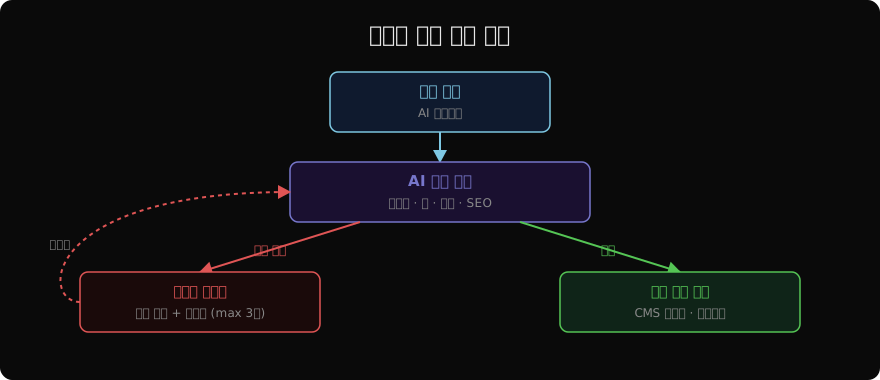
사람 검수
자동 발행 금지 항목
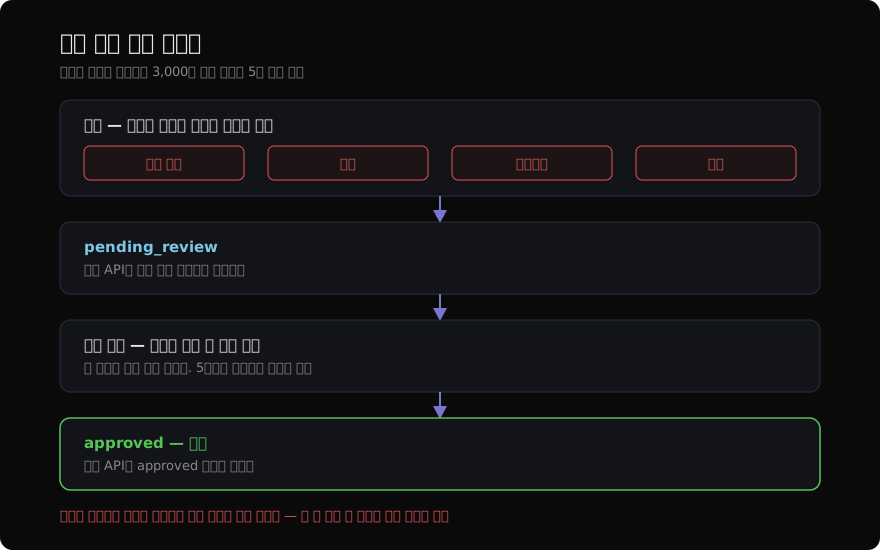
파이프라인이 아무리 촘촘해도 자동 발행하면 안 되는 것이 넷 있다.
사실 주장이 첫째다. 「이 방식은 업계 표준입니다」 같은 문장은 검증할 수 없고, 틀렸을 때 브랜드가 책임진다. 수치가 둘째다. 「도입 기업의 73%가」의 73%가 어디서 왔는지 모델은 대개 모른다. 고유명사가 셋째다 — 회사 이름, 제품 이름, 사람 이름은 비슷한 다른 것으로 바뀌기 쉽다. 인용이 넷째다. 존재하지 않는 보고서와 존재하지 않는 문장이 가장 그럴듯하게 만들어지는 자리다.
검수 지점 고정
「사람이 검수한다」는 원칙만으로는 지켜지지 않는다. 바빠지면 건너뛰기 때문이고, 한 번 건너뛰어도 아무 일이 없으면 그다음부터는 늘 건너뛴다. 그래서 파이프라인이 사람 없이는 다음 단계로 못 가게 만든다. 위 네 종류를 포함한 초안은 pending_review 상태로만 저장되고, 발행 API는 approved 상태만 받는다. 검수자가 한 명도 안 붙었을 때 시스템이 조용히 발행하는 경로가 아예 없어야 한다.
여기서 자주 하는 실수가 「급할 때 쓰는 우회 경로」를 열어 두는 것이다. 관리자 계정으로는 검수 없이 발행할 수 있게 해 두면, 몇 주 안에 그 경로가 기본 경로가 된다. 정말 급한 발행이 필요하다면 우회로를 만들 것이 아니라 검수를 5분 일로 줄여야 하고, 그것이 다음 소절의 이야기다.
단정 자리 표시
검수를 강제하면 사람의 일이 는다. 그 일을 줄이는 방법은 모델이 자기가 단정한 자리를 표시하게 하는 것이다. 초안 생성 단계에서 사실 주장·수치·고유명사·인용에 마크업을 달게 하면, 검수자가 글 전체를 다시 읽는 대신 표시된 자리 열 개만 확인하면 된다. 3,000자 글에서 확인할 곳이 열 군데로 줄면 검수가 5분 일이 되고, 5분이면 사람들이 실제로 한다.
형식 확장
형식별 프롬프트 표
블로그로 시작한 파이프라인에 제품 설명, 뉴스레터, 소셜 게시물이 붙는다. 처음에는 형식별 설정을 표로 두고 같은 파이프라인에 갈아 끼우는 것으로 충분하다. 형식마다 다른 것이 구조·길이·마무리 문장 정도라면, 그 셋을 데이터로 두고 나머지 단계는 그대로 쓰는 편이 코드가 훨씬 적다.
CONTENT_FORMATS = {
    "blog": {
        "structure": "도입 → 본론 → 결론, H2/H3 소제목 사용",
        "length": "1000~2000 words",
        "cta": "글 마지막에 구독 또는 공유 유도",
    },
    "product_description": {
        "structure": "핵심 가치 → 주요 기능 → 사용 사례 → 기술 사양",
        "length": "200~500 words",
        "cta": "구매 또는 무료 체험 유도",
    },
    "email_newsletter": {
        "structure": "훅 → 주요 내용 → 액션 아이템",
        "length": "300~500 words",
        "cta": "클릭 유도 링크 포함",
    },
}
분리 신호
표로 버티지 못하는 순간이 온다. 신호는 둘이다.
단계 구성 자체가 달라질 때가 첫째다. 소셜 게시물은 280자라 아웃라인 단계가 필요 없고, 병렬 작성도 의미가 없다. 표에 skip_outline: true 같은 항목이 붙기 시작하면 그건 이미 다른 파이프라인이다.
검수 규칙이 달라질 때가 둘째다. 제품 설명에는 사양 수치가 반드시 들어가고 그 수치는 제품 데이터베이스와 대조해야 한다. 블로그에는 없는 단계다. 형식별 조건문이 코드에 셋 이상 생기면 나누는 편이 읽기 쉽다.
캘린더와 파이프라인의 연결
마지막으로 무엇을 언제 쓸지 정하는 자리가 있다. 주제 풀과 주당 발행 횟수를 주면 한 달치 계획을 잡아 준다.
def create_content_calendar(
    brand_topics: list[str],
    month: str,
    posts_per_week: int = 3,
) -> list[dict]:
    response = client.messages.create(
        model="claude-opus-4-7",
        max_tokens=2048,
        system="콘텐츠 마케팅 담당자로서 콘텐츠 캘린더를 JSON으로 작성하세요.",
        messages=[
            {
                "role": "user",
                "content": (
                    f"월: {month}\n"
                    f"주제 풀: {brand_topics}\n"
                    f"주당 발행: {posts_per_week}회\n\n"
                    '각 항목: {"date": "...", "topic": "...", '
                    '"keywords": [...], "format": "blog|product_description|email_newsletter"}'
                ),
            }
        ],
    )
    return json.loads(response.content[0].text)
캘린더를 자동으로 잡는 것까지는 쉬운데, 캘린더가 파이프라인을 자동으로 트리거하게 만드는 것은 한 번 더 생각한다. 한 달치가 검수 없이 발행 큐에 쌓이면 앞에서 만든 사람 검수 지점이 병목이 되어 결국 건너뛰게 된다. 계획은 자동으로 잡되 실행은 사람이 그날 시작하는 편이, 만들어 놓고 안 쓰는 파이프라인이 되는 것보다 낫다.
읽어주셔서 감사합니다. 😊