

지난 글에서 OpenAI 호환 API 서버의 기본 구조를 설계했다. LLM의 특성상 응답 생성에 수 초에서 수십 초가 걸리는데, 사용자가 완성된 응답을 기다리게 하면 UX가 크게 떨어진다. 스트리밍은 첫 토큰부터 즉시 전송해 ChatGPT처럼 타이핑되는 효과를 만든다.
스트리밍이 필요한 이유
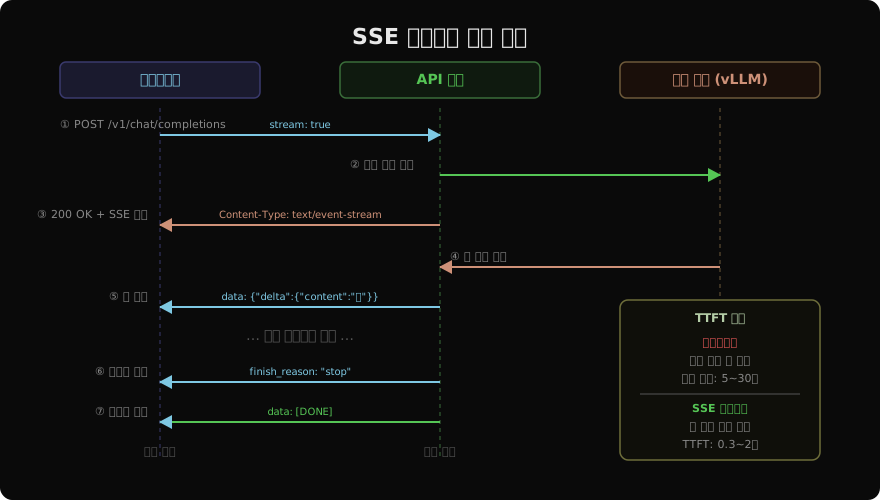
LLM은 토큰을 하나씩 순차적으로 생성한다. 500토큰(약 375단어) 응답을 초당 50토큰으로 생성하면 완료까지 10초가 걸린다. 비스트리밍 방식에서는 사용자가 10초 동안 빈 화면을 본다. 스트리밍은 첫 토큰(TTFT, Time To First Token)을 0.3~2초 내에 보여줘서 체감 대기 시간을 10배 이상 줄인다.
SSE(Server-Sent Events) 프로토콜
SSE는 서버에서 클라이언트로 단방향 실시간 메시지를 보내는 HTTP 표준 프로토콜이다. OpenAI가 LLM 스트리밍에 SSE를 채택했고, 이후 모든 LLM API의 표준이 됐다.
# SSE 데이터 형식 (HTTP 응답 본문)
HTTP/1.1 200 OK
Content-Type: text/event-stream
Cache-Control: no-cache
Connection: keep-alive

data: {"id":"chatcmpl-xyz","choices":[{"delta":{"role":"assistant"},"finish_reason":null}]}

data: {"id":"chatcmpl-xyz","choices":[{"delta":{"content":"안"},"finish_reason":null}]}

data: {"id":"chatcmpl-xyz","choices":[{"delta":{"content":"녕"},"finish_reason":null}]}

data: {"id":"chatcmpl-xyz","choices":[{"delta":{"content":"하세요"},"finish_reason":"stop"}]}

data: [DONE]
각 메시지는 data: 접두사로 시작하고, 빈 줄(\n\n)로 구분된다. [DONE]은 스트림 종료를 알리는 관례적 신호다.
FastAPI 스트리밍 서버 구현
from fastapi import FastAPI
from fastapi.responses import StreamingResponse
from vllm import AsyncLLMEngine, AsyncEngineArgs, SamplingParams
import json, uuid, time

app = FastAPI()
engine = AsyncLLMEngine.from_engine_args(
    AsyncEngineArgs(model="meta-llama/Llama-3.1-8B-Instruct")
)

async def token_stream(prompt: str, params: SamplingParams, req_id: str, model: str):
    """토큰을 SSE 청크로 변환하는 비동기 제너레이터"""
    prev_len = 0
    created = int(time.time())

    async for output in engine.generate(prompt, params, req_id):
        token_output = output.outputs[0]
        new_text = token_output.text[prev_len:]
        prev_len = len(token_output.text)

        if not new_text:
            continue

        chunk = {
            "id": f"chatcmpl-{req_id[:8]}",
            "object": "chat.completion.chunk",
            "created": created,
            "model": model,
            "choices": [{
                "index": 0,
                "delta": {"content": new_text},
                "finish_reason": None,
            }],
        }
        yield f"data: {json.dumps(chunk, ensure_ascii=False)}\n\n"

    # 종료 시그널
    final_chunk = {
        "id": f"chatcmpl-{req_id[:8]}",
        "object": "chat.completion.chunk",
        "created": created,
        "model": model,
        "choices": [{"index": 0, "delta": {}, "finish_reason": "stop"}],
    }
    yield f"data: {json.dumps(final_chunk)}\n\n"
    yield "data: [DONE]\n\n"

@app.post("/v1/chat/completions")
async def chat(req: dict):
    if not req.get("stream"):
        # 비스트리밍 처리 (생략)
        ...

    prompt = format_messages(req["messages"])
    params = SamplingParams(
        temperature=req.get("temperature", 0.7),
        max_tokens=req.get("max_tokens", 1024),
    )
    req_id = str(uuid.uuid4())

    return StreamingResponse(
        token_stream(prompt, params, req_id, req.get("model", "")),
        media_type="text/event-stream",
        headers={
            "Cache-Control": "no-cache",
            "X-Accel-Buffering": "no",  # Nginx 버퍼링 비활성화
            "Transfer-Encoding": "chunked",
        },
    )
클라이언트 구현
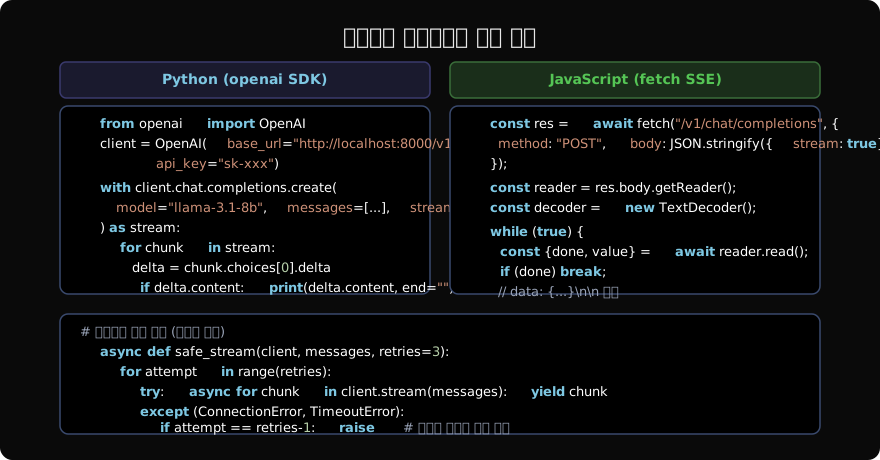
Python 비동기 클라이언트
import asyncio
from openai import AsyncOpenAI

async def stream_chat(question: str):
    client = AsyncOpenAI(
        base_url="http://localhost:8000/v1",
        api_key="sk-xxx",
    )

    full_text = ""
    async with client.chat.completions.stream(
        model="llama-3.1-8b-instruct",
        messages=[{"role": "user", "content": question}],
    ) as stream:
        async for chunk in stream:
            delta = chunk.choices[0].delta
            if delta.content:
                print(delta.content, end="", flush=True)
                full_text += delta.content

    print()  # 줄바꿈
    return full_text

asyncio.run(stream_chat("한국의 4계절을 설명해줘"))
JavaScript/TypeScript 클라이언트
async function streamChat(question: string): Promise<string> {
  const response = await fetch("/v1/chat/completions", {
    method: "POST",
    headers: {
      "Content-Type": "application/json",
      "Authorization": "Bearer sk-xxx",
    },
    body: JSON.stringify({
      model: "llama-3.1-8b-instruct",
      messages: [{ role: "user", content: question }],
      stream: true,
    }),
  });

  const reader = response.body!.getReader();
  const decoder = new TextDecoder();
  let fullText = "";

  while (true) {
    const { done, value } = await reader.read();
    if (done) break;

    const lines = decoder.decode(value).split("\n");
    for (const line of lines) {
      if (!line.startsWith("data: ")) continue;
      const data = line.slice(6).trim();
      if (data === "[DONE]") return fullText;

      const chunk = JSON.parse(data);
      const content = chunk.choices?.[0]?.delta?.content ?? "";
      if (content) {
        fullText += content;
        // React 상태 업데이트 또는 DOM 조작
        document.getElementById("output")!.textContent = fullText;
      }
    }
  }
  return fullText;
}
EventSource API (브라우저 기본 SSE)
POST가 아닌 GET 요청을 쓰는 경우, 브라우저의 기본 EventSource API를 사용할 수 있다. 단, OpenAI 호환 API는 POST를 사용하므로 직접 fetch를 써야 한다.
// GET 기반 SSE (서버 설계에 따라 선택)
const source = new EventSource("/stream?q=안녕하세요");

source.onmessage = (event) => {
  if (event.data === "[DONE]") {
    source.close();
    return;
  }
  const chunk = JSON.parse(event.data);
  console.log(chunk.choices[0].delta.content);
};

source.onerror = () => {
  // EventSource는 자동 재연결됨
  console.log("재연결 중...");
};
WebSocket 대안
SSE는 서버→클라이언트 단방향이다. 실시간 양방향 통신(예: 멀티턴 음성 대화)이 필요하면 WebSocket을 쓴다.
from fastapi import WebSocket

@app.websocket("/ws/chat")
async def websocket_chat(ws: WebSocket):
    await ws.accept()

    try:
        while True:
            # 클라이언트 메시지 수신
            data = await ws.receive_json()
            messages = data["messages"]

            # 스트리밍 응답 전송
            prompt = format_messages(messages)
            params = SamplingParams(max_tokens=1024)
            req_id = str(uuid.uuid4())

            async for output in engine.generate(prompt, params, req_id):
                token = output.outputs[0].text
                await ws.send_json({
                    "type": "token",
                    "content": token,
                })

            await ws.send_json({"type": "done"})

    except Exception:
        await ws.close()
Nginx 프록시 설정
스트리밍은 프록시 서버의 버퍼링 설정이 중요하다. Nginx가 응답을 버퍼링하면 토큰이 묶음으로 전달돼 스트리밍 효과가 사라진다.
location /v1/ {
    proxy_pass http://llm_backend;
    proxy_http_version 1.1;

    # 스트리밍 필수 설정
    proxy_buffering off;           # 버퍼링 비활성화
    proxy_cache off;
    proxy_read_timeout 300s;       # 긴 생성 시간 허용
    proxy_send_timeout 300s;

    # SSE 연결 유지
    proxy_set_header Connection "";
    chunked_transfer_encoding on;
}
오류 처리와 재연결
import asyncio

async def resilient_stream(client, messages: list, max_retries: int = 3):
    """재시도 로직을 포함한 안전한 스트리밍"""
    for attempt in range(max_retries):
        try:
            buffer = ""
            async with client.chat.completions.stream(
                model="llama-3.1-8b-instruct",
                messages=messages,
            ) as stream:
                async for chunk in stream:
                    content = chunk.choices[0].delta.content or ""
                    buffer += content
                    yield content
            return  # 성공하면 종료

        except Exception as e:
            if attempt == max_retries - 1:
                raise  # 최대 재시도 초과

            # 지수 백오프
            wait = 2 ** attempt
            print(f"스트림 오류 ({e}), {wait}초 후 재시도...")
            await asyncio.sleep(wait)

            # 이미 출력한 부분은 제외하고 재시작 (중복 방지)
            messages = messages + [
                {"role": "assistant", "content": buffer},
                {"role": "user", "content": "[이어서 계속해줘]"},
            ]
정리
스트리밍은 LLM 서비스의 UX를 결정하는 핵심 기능이다:
- SSE: HTTP 표준, POST 지원, OpenAI 호환 방식 (대부분의 경우)
- WebSocket: 양방향 통신 필요 시 (음성·실시간 대화)
- Nginx 설정:
proxy_buffering off필수 - 클라이언트: Python은
openai.AsyncOpenAI, JS는fetch+ReadableStream - 오류 처리: 재연결 시 이미 출력된 내용 추적해 중복 방지
지난 글: LLM 서빙 API 설계: OpenAI 호환 인터페이스 구축
다음 글: LLM API 속도 제한: Rate Limiting 전략과 구현
읽어주셔서 감사합니다. 😊